

PitchPrint Color System
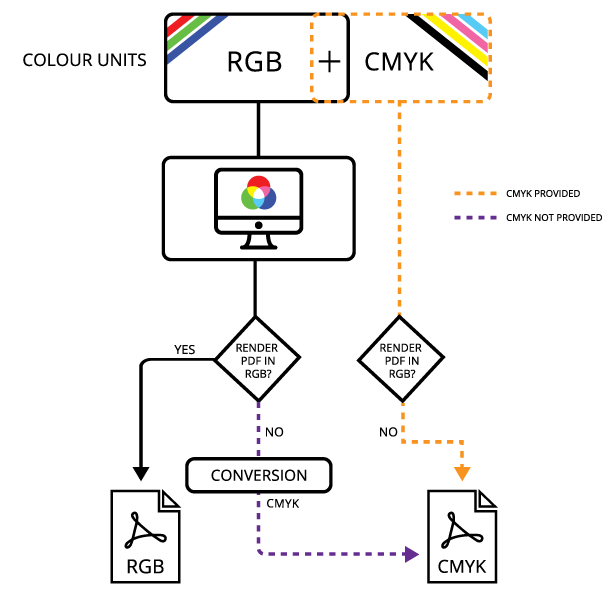
 If however, you did not provide a CMYK value, the system will do a conversion of the current RGB to CMYK and use the converted value in creating the PDF.
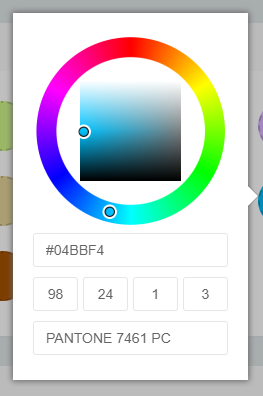
Remember, If a CMYK + SPOT value is provided, the system automatically uses that value for the PDF and so, if your screen preview’s color vastly differs from the PDF output, it must be that the colors you provided do not match. The system does not do any conversion unless either is missing. It simply uses those values are they are provided.
If however, you did not provide a CMYK value, the system will do a conversion of the current RGB to CMYK and use the converted value in creating the PDF.
Remember, If a CMYK + SPOT value is provided, the system automatically uses that value for the PDF and so, if your screen preview’s color vastly differs from the PDF output, it must be that the colors you provided do not match. The system does not do any conversion unless either is missing. It simply uses those values are they are provided.
- RGB format: #RRGGBB (Example #A8E305)
- CMYK Format: CCC MMM YYY KKK (Each value is 0 to 100 . Example: 90 34 9 100)
- SPOT: String value of the spot name
Related articles
Color Palette
Create five-color complementary themes customers can sample to restyle a design.
Swatch Module
Let customers switch a design’s color theme, background and preview within the editor.
Template Color Module
Let customers switch template images, such as T-shirt colors, at design time.
Template Colour Designs
Learn what template-based designs are and how template images are swapped in the editor.