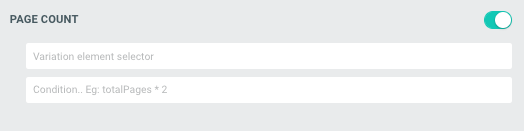
Keep your product quantity in sync with the number of pages in a PitchPrint project, with a condition to control the value passed.
The Page Count module allows for the quantity element of your product to be updated as the page count changes in a PitchPrint project.So if the designer has 1 page to start off with and your customer adds another page to their project, the quantity element will be updated to 2.Variation element selector = (the element selector of the quantity element on your product page).The condition section allows you to determine what the value should be that get’s passed to the quantity element on your product page.
Example you have a business card product and consider back and front to be 2 pages on PitchPrint but 1 product on your store.
You’ll then provide the condition that the total number of pages in PitchPrint should be divided by 2 (totalPages / 2) for this to be considered as one count of the business card product.If you need help with finding the variation element selector, you can contact our support.
Let customers open the editor with a single-sided or double-sided design.
Shuffle Module
A phone-based layout module for quickly building and editing photo books.
{"docsConfig":{"theme":"mint","$schema":"https://mintlify.com/docs.json","name":"PitchPrint","colors":{"primary":"#6022E7","light":"#8B5CF6","dark":"#4C1BC4"},"logo":{"light":"https://mintcdn.com/pitchprint/lFqp-OsyXnf1Fc9b/brand/logo/light.svg?fit=max\u0026auto=format\u0026n=lFqp-OsyXnf1Fc9b\u0026q=85\u0026s=ec857289e0ade69316f8eff623821ad8","dark":"https://mintcdn.com/pitchprint/lFqp-OsyXnf1Fc9b/brand/logo/dark.svg?fit=max\u0026auto=format\u0026n=lFqp-OsyXnf1Fc9b\u0026q=85\u0026s=504b6c4556dad8a811dd61d2b802ecce"},"favicon":"https://mintcdn.com/pitchprint/lFqp-OsyXnf1Fc9b/brand/favicon.svg?fit=max\u0026auto=format\u0026n=lFqp-OsyXnf1Fc9b\u0026q=85\u0026s=b6f4f01ffcc134da4657f0b0d0a1b395","navbar":{"links":[{"href":"https://pitchprint.com","label":"Website"}],"primary":{"type":"button","label":"Dashboard","href":"https://admin.pitchprint.com/login"}},"footer":{"socials":{"x":"https://x.com/pitchprint","github":"https://github.com/pitchprint","linkedin":"https://linkedin.com/company/pitchprint"},"links":[{"header":"Product","items":[{"label":"PitchPrint","href":"https://pitchprint.com"},{"label":"Dashboard","href":"https://pitchprint.com/dashboard"}]},{"header":"Blog","items":[{"label":"Articles","href":"/blog/posts/ai-studio"},{"label":"Releases","href":"/blog/releases/2026"}]}]},"errors":{"404":{"redirect":false,"title":"Page not found","description":"This page may have moved when we rebuilt the docs. Try [search](/docs), the [installation guides](/docs/documentation/which-framework-should-i-pick), or the [API reference](/docs/api-reference/introduction). Still stuck? Email [support@pitchprint.com](mailto:support@pitchprint.com)."}},"contextual":{"options":["copy","view","chatgpt","claude","perplexity","mcp","cursor","vscode"],"display":"header"},"styling":{"latex":true},"navigation":{"global":{"anchors":[{"anchor":"Demos","icon":"circle-play","href":"https://wp.demo.pitchprint.io"},{"anchor":"Support","icon":"envelope","href":"mailto:support@pitchprint.com"}]},"pages":[]}},"deployment":{"deploymentMetadataValue":{"subdomain":"pitchprint","hasAudioNarration":false,"actualSubdomain":"pitchprint","customDomains":["pitchprint.com"],"gitSource":{"type":"github","owner":"pitchprint","repo":"docs","deployBranch":"main","contentDirectory":"","isPrivate":false,"mountPath":"","label":""},"chroma":{"collectionId":"8b3f5e9d-7001-4a57-9541-4a2322cc6249","liveDeploymentHistoryId":"6ad5d0509685d528bc7fa825","schemaVersion":"v3","latestBuiltDeploymentHistoryId":"6ad5d0509685d528bc7fa825"},"entitlements":{"AI_CHAT":{"status":"DISABLED"}},"buildId":"6ae07d5c01e51dac894edfaf","clientVersion":"0.0.3971","searchFilterCounts":[{"language":"default","tag":"Documentation","count":154},{"language":"default","tag":"Tutorial","count":91},{"language":"default","tag":"Blog","count":39},{"language":"default","tag":"Tips 'n Tricks","count":32},{"language":"default","tag":"Admin Guide","count":27},{"language":"default","tag":"Using Modules","count":20},{"language":"default","tag":"API Reference","count":19},{"language":"default","tag":"Articles","count":14},{"language":"default","tag":"Installation Guide","count":12},{"language":"default","tag":"Sample Solutions","count":11}]},"assistantConfig":{"enableAskAiButton":false,"enableStarterQuestions":false,"enableContextualStarterQuestions":false,"enableAskAiSearchBar":true},"basePath":"","hasChatPermissions":false,"hasWebMcpPermissions":false,"toggles":[{"name":"kill-isr","enabled":true,"variant":{"name":"disabled","enabled":false,"feature_enabled":true},"impressionData":false},{"name":"agent-mintlify-slack","enabled":true,"variant":{"name":"disabled","enabled":false,"feature_enabled":true},"impressionData":false},{"name":"editor-v7-file-tree","enabled":true,"variant":{"name":"disabled","enabled":false,"feature_enabled":true},"impressionData":false},{"name":"agent-integrations-settings","enabled":true,"variant":{"name":"disabled","enabled":false,"feature_enabled":true},"impressionData":false},{"name":"automations-pr-grouping","enabled":true,"variant":{"name":"disabled","enabled":false,"feature_enabled":true},"impressionData":false},{"name":"custom-prefix","enabled":true,"variant":{"name":"disabled","enabled":false,"feature_enabled":true},"impressionData":false},{"name":"analytics-v7","enabled":true,"variant":{"name":"disabled","enabled":false,"feature_enabled":true},"impressionData":false},{"name":"user-flows-analytics","enabled":true,"variant":{"name":"disabled","enabled":false,"feature_enabled":true},"impressionData":false},{"name":"no-publish-flow","enabled":true,"variant":{"name":"disabled","enabled":false,"feature_enabled":true},"impressionData":false},{"name":"workos-onboarding","enabled":true,"variant":{"name":"disabled","enabled":false,"feature_enabled":true},"impressionData":false},{"name":"llms-txt-v2","enabled":true,"variant":{"name":"disabled","enabled":false,"feature_enabled":true},"impressionData":false},{"name":"pause-universal-search-reconcile","enabled":true,"variant":{"name":"disabled","enabled":false,"feature_enabled":true},"impressionData":false},{"name":"snapshot-serving-live","enabled":true,"variant":{"name":"disabled","enabled":false,"feature_enabled":true},"impressionData":false},{"name":"stripTemperatureMiddleware","enabled":true,"variant":{"name":"disabled","enabled":false,"feature_enabled":true},"impressionData":false},{"name":"per-site-search-delta","enabled":true,"variant":{"name":"disabled","enabled":false,"feature_enabled":true},"impressionData":false},{"name":"support-platform-pylon-zendesk","enabled":true,"variant":{"name":"disabled","enabled":false,"feature_enabled":true},"impressionData":false},{"name":"snapshot-serving","enabled":true,"variant":{"name":"disabled","enabled":false,"feature_enabled":true},"impressionData":false},{"name":"instant-rollback","enabled":true,"variant":{"name":"disabled","enabled":false,"feature_enabled":true},"impressionData":false},{"name":"granular-notifications-server","enabled":true,"variant":{"name":"disabled","enabled":false,"feature_enabled":true},"impressionData":false},{"name":"granular-notifications","enabled":true,"variant":{"name":"disabled","enabled":false,"feature_enabled":true},"impressionData":false},{"name":"editor-private-page-search","enabled":true,"variant":{"name":"disabled","enabled":false,"feature_enabled":true},"impressionData":false},{"name":"automations-fable","enabled":true,"variant":{"name":"disabled","enabled":false,"feature_enabled":true},"impressionData":false},{"name":"fixed-ai-action-pricing","enabled":true,"variant":{"name":"disabled","enabled":false,"feature_enabled":true},"impressionData":false},{"name":"automation-resolve-merge-conflict","enabled":true,"variant":{"name":"disabled","enabled":false,"feature_enabled":true},"impressionData":false},{"name":"scoped-publishing","enabled":true,"variant":{"name":"disabled","enabled":false,"feature_enabled":true},"impressionData":false},{"name":"mintql","enabled":true,"variant":{"name":"disabled","enabled":false,"feature_enabled":true},"impressionData":false},{"name":"page-level-analytics","enabled":true,"variant":{"name":"disabled","enabled":false,"feature_enabled":true},"impressionData":false},{"name":"editor-version-history-v2","enabled":true,"variant":{"name":"disabled","enabled":false,"feature_enabled":true},"impressionData":false},{"name":"editor-nav-generations","enabled":true,"variant":{"name":"disabled","enabled":false,"feature_enabled":true},"impressionData":false},{"name":"billing-page-v2","enabled":true,"variant":{"name":"disabled","enabled":false,"feature_enabled":true},"impressionData":false},{"name":"workspace-projects","enabled":true,"variant":{"name":"disabled","enabled":false,"feature_enabled":true},"impressionData":false},{"name":"assistant-v5","enabled":true,"variant":{"name":"disabled","enabled":false,"feature_enabled":true},"impressionData":false},{"name":"byok-sep-25","enabled":true,"variant":{"name":"disabled","enabled":false,"feature_enabled":true},"impressionData":false},{"name":"fork-pr-previews","enabled":true,"variant":{"name":"disabled","enabled":false,"feature_enabled":true},"impressionData":false},{"name":"revalidation-jwt","enabled":true,"variant":{"name":"disabled","enabled":false,"feature_enabled":true},"impressionData":false},{"name":"vite-origin","enabled":true,"variant":{"name":"disabled","enabled":false,"feature_enabled":true},"impressionData":false},{"name":"editor-agent-model-picker","enabled":true,"variant":{"name":"disabled","enabled":false,"feature_enabled":true},"impressionData":false},{"name":"billing-updated-9-15","enabled":true,"variant":{"name":"disabled","enabled":false,"feature_enabled":true},"impressionData":false},{"name":"workos-sso-scim","enabled":true,"variant":{"name":"disabled","enabled":false,"feature_enabled":true},"impressionData":false},{"name":"hobby-abuse-scan","enabled":true,"variant":{"name":"disabled","enabled":false,"feature_enabled":true},"impressionData":false},{"name":"dashboard-inbox","enabled":true,"variant":{"name":"disabled","enabled":false,"feature_enabled":true},"impressionData":false},{"name":"workos-signup","enabled":true,"variant":{"name":"disabled","enabled":false,"feature_enabled":true},"impressionData":false},{"name":"workos-enabled","enabled":true,"variant":{"name":"disabled","enabled":false,"feature_enabled":true},"impressionData":false}],"isAtlas":false,"googleFontsInlined":false},"customCss":[{"filePath":"style.css","content":"header button[aria-haspopup=menu],nav button[aria-haspopup=menu]{display:none!important}"}],"page":{"pagePath":"docs/tutorial/how-to-use-page-count-module","slug":"/docs/tutorial/how-to-use-page-count-module","pageMetadata":{"title":"Page Count","description":"Keep your product quantity in sync with the number of pages in a PitchPrint project, with a condition to control the value passed.","href":"/docs/tutorial/how-to-use-page-count-module"},"description":{"compiledSource":"\"use strict\";\nconst {jsx: _jsx} = arguments[0];\nconst {useMDXComponents: _provideComponents} = arguments[0];\nfunction _createMdxContent(props) {\n const _components = {\n p: \"p\",\n ..._provideComponents(),\n ...props.components\n };\n return _jsx(_components.p, {\n children: \"Keep your product quantity in sync with the number of pages in a PitchPrint project, with a condition to control the value passed.\"\n });\n}\nfunction MDXContent(props = {}) {\n const {wrapper: MDXLayout} = {\n ..._provideComponents(),\n ...props.components\n };\n return MDXLayout ? _jsx(MDXLayout, {\n ...props,\n children: _jsx(_createMdxContent, {\n ...props\n })\n }) : _createMdxContent(props);\n}\nreturn {\n default: MDXContent\n};\n","frontmatter":{},"scope":{}},"pageType":"default","mdx":{"mdxSource":{"compiledSource":"\"use strict\";const{Fragment:_Fragment,jsx:_jsx,jsxs:_jsxs}=arguments[0];const{useMDXComponents:_provideComponents}=arguments[0];function _createMdxContent(props){const _components={p:`p`,..._provideComponents(),...props.components},{Card,CardGroup,Frame,Heading,OptimizedImage}=_components;if(!Card)_missingMdxReference(`Card`,true);if(!CardGroup)_missingMdxReference(`CardGroup`,true);if(!Frame)_missingMdxReference(`Frame`,true);if(!Heading)_missingMdxReference(`Heading`,true);if(!OptimizedImage)_missingMdxReference(`OptimizedImage`,true);return _jsxs(_Fragment,{children:[_jsx(Frame,{children:_jsx(OptimizedImage,{src:`https://s3.amazonaws.com/helpscout.net/docs/assets/58f1ec6d2c7d3a52b42f8254/images/5ce7c4512c7d3a32d2a4c2b1/file-sQq10bzfmT.png`,alt:`Page Count module settings with the variation element selector and condition fields`})}),`\n`,_jsx(_components.p,{children:`The Page Count module allows for the quantity element of your product to be updated as the page count changes in a PitchPrint project.`}),`\n`,_jsx(_components.p,{children:`So if the designer has 1 page to start off with and your customer adds another page to their project, the quantity element will be updated to 2.`}),`\n`,_jsx(_components.p,{children:`Variation element selector = (the element selector of the quantity element on your product page).`}),`\n`,_jsx(_components.p,{children:`The condition section allows you to determine what the value should be that get’s passed to the quantity element on your product page.\nExample you have a business card product and consider back and front to be 2 pages on PitchPrint but 1 product on your store.\nYou’ll then provide the condition that the total number of pages in PitchPrint should be divided by 2 (totalPages / 2) for this to be considered as one count of the business card product.`}),`\n`,_jsx(_components.p,{children:`If you need help with finding the variation element selector, you can contact our support.`}),`\n`,_jsx(Heading,{level:`2`,id:`related-articles`,children:`Related articles`}),`\n`,_jsxs(CardGroup,{cols:2,children:[_jsx(Card,{title:`Single/Double Sided Module`,icon:`copy`,href:`/docs/tutorial/single-double-sided-module`,children:_jsx(_components.p,{children:`Let customers open the editor with a single-sided or double-sided design.`})}),_jsx(Card,{title:`Shuffle Module`,icon:`layer-group`,href:`/docs/tutorial/shuffle-module`,children:_jsx(_components.p,{children:`A phone-based layout module for quickly building and editing photo books.`})})]})]})}function MDXContent(props={}){const{wrapper:MDXLayout}={..._provideComponents(),...props.components};return MDXLayout?_jsx(MDXLayout,{...props,children:_jsx(_createMdxContent,{...props})}):_createMdxContent(props)}return{default:MDXContent};function _missingMdxReference(id,component){throw new Error(`Expected `+(component?`component`:`object`)+\" `\"+id+\"` to be defined: you likely forgot to import, pass, or provide it.\")}","frontmatter":{},"scope":{"config":{},"pageMetadata":{"title":"Page Count","description":"Keep your product quantity in sync with the number of pages in a PitchPrint project, with a condition to control the value passed.","href":"/docs/tutorial/how-to-use-page-count-module"}}},"mdxSourceWithNoJs":null},"mdxExtracts":{"tableOfContents":[{"title":"Related articles","slug":"related-articles","depth":2,"children":[]}],"codeExamples":{}},"jsLinks":["/_mintlify/custom/pitchprint/886e30c9af4224f6/scripts/convert-to-markdown.js","/_mintlify/custom/pitchprint/c953c1c1f34b6af4/scripts/example.js","/_mintlify/custom/pitchprint/14cc91d930d58432/scripts/helpscout.js","/_mintlify/custom/pitchprint/8f78fad523c4930d/scripts/publish-to-docs.js","/_mintlify/custom/pitchprint/8be7daf1bdca8db0/scripts/generate-blog-summaries.js","/_mintlify/custom/pitchprint/fc72494a10805019/scripts/ingest-new.js","/_mintlify/custom/pitchprint/dec987e667653622/scripts/report-drift.js","/_mintlify/custom/pitchprint/e456009a2e9f0ad5/scripts/registry.js","/_mintlify/custom/pitchprint/13fc4b20d6eac8f8/scripts/fetch-blog-releases.js"],"subdomain":"pitchprint","siteName":"PitchPrint","title":"Page Count - PitchPrint","navMaps":{"firstHrefInVersion":{},"firstHrefInLanguage":{}},"lastModified":"2026-08-17T19:31:58.595Z","originalFileLocation":"docs/tutorial/how-to-use-page-count-module.mdx"},"headHtml":"\u003cscript data-mint-head>(function(){var d=document.documentElement,p=null;if(!p){try{p=localStorage.getItem(\"isDarkMode\")}catch(e){}if(p==='true')p='dark';else if(p==='false')p='light';if(p!=='light'\u0026\u0026p!=='dark'\u0026\u0026p!=='system')p=\"system\"}var r=p==='system'?(matchMedia(\"(prefers-color-scheme: dark)\").matches?'dark':'light'):p;d.classList.remove(r==='dark'?'light':'dark');d.classList.add(r);d.setAttribute(\"data-theme-preference\",p)})();\u003c/script>\u003cmeta data-mint-head name=\"description\" content=\"Keep your product quantity in sync with the number of pages in a PitchPrint project, with a condition to control the value passed.\">\u003cmeta data-mint-head name=\"application-name\" content=\"PitchPrint\">\u003cmeta data-mint-head name=\"generator\" content=\"Mintlify\">\u003clink data-mint-head rel=\"icon\" type=\"image/png\" sizes=\"192x192\" href=\"/mintlify-assets/_mintlify/favicons/pitchprint/6gqAs1_dwfh54HA4/_generated/favicon/android-chrome-192x192.png\" media=\"(prefers-color-scheme: light)\">\u003clink data-mint-head rel=\"apple-touch-icon\" type=\"image/png\" sizes=\"180x180\" href=\"/mintlify-assets/_mintlify/favicons/pitchprint/6gqAs1_dwfh54HA4/_generated/favicon/apple-touch-icon.png\">\u003clink data-mint-head rel=\"icon\" type=\"image/png\" sizes=\"16x16\" href=\"/mintlify-assets/_mintlify/favicons/pitchprint/6gqAs1_dwfh54HA4/_generated/favicon/favicon-16x16.png\" media=\"(prefers-color-scheme: light)\">\u003clink data-mint-head rel=\"icon\" type=\"image/png\" sizes=\"32x32\" href=\"/mintlify-assets/_mintlify/favicons/pitchprint/6gqAs1_dwfh54HA4/_generated/favicon/favicon-32x32.png\" media=\"(prefers-color-scheme: light)\">\u003clink data-mint-head rel=\"shortcut icon\" type=\"image/x-icon\" href=\"/mintlify-assets/_mintlify/favicons/pitchprint/6gqAs1_dwfh54HA4/_generated/favicon/favicon.ico\" media=\"(prefers-color-scheme: light)\">\u003clink data-mint-head rel=\"icon\" type=\"image/png\" sizes=\"192x192\" href=\"/mintlify-assets/_mintlify/favicons/pitchprint/6gqAs1_dwfh54HA4/_generated/favicon-dark/android-chrome-192x192.png\" media=\"(prefers-color-scheme: dark)\">\u003clink data-mint-head rel=\"icon\" type=\"image/png\" sizes=\"16x16\" href=\"/mintlify-assets/_mintlify/favicons/pitchprint/6gqAs1_dwfh54HA4/_generated/favicon-dark/favicon-16x16.png\" media=\"(prefers-color-scheme: dark)\">\u003clink data-mint-head rel=\"icon\" type=\"image/png\" sizes=\"32x32\" href=\"/mintlify-assets/_mintlify/favicons/pitchprint/6gqAs1_dwfh54HA4/_generated/favicon-dark/favicon-32x32.png\" media=\"(prefers-color-scheme: dark)\">\u003clink data-mint-head rel=\"shortcut icon\" type=\"image/x-icon\" href=\"/mintlify-assets/_mintlify/favicons/pitchprint/6gqAs1_dwfh54HA4/_generated/favicon-dark/favicon.ico\" media=\"(prefers-color-scheme: dark)\">\u003cmeta data-mint-head property=\"og:title\" content=\"Page Count - PitchPrint\">\u003cmeta data-mint-head property=\"og:description\" content=\"Keep your product quantity in sync with the number of pages in a PitchPrint project, with a condition to control the value passed.\">\u003cmeta data-mint-head property=\"og:site_name\" content=\"PitchPrint\">\u003cmeta data-mint-head property=\"og:url\" content=\"https://pitchprint.com/docs/tutorial/how-to-use-page-count-module\">\u003cmeta data-mint-head property=\"og:type\" content=\"website\">\u003cmeta data-mint-head property=\"og:image\" content=\"https://pitchprint.mintlify.app/_mintlify/api/og/v2?division=Pages+%26+Layout\u0026amp;title=Page+Count\u0026amp;description=Keep+your+product+quantity+in+sync+with+the+number+of+pages+in+a+PitchPrint+project%2C+with+a+condition+to+control+the+value+passed.\u0026amp;theme=597b42b10e9ef5f4e0b4869a\u0026amp;signature=322c7c944c6a5de972a09ce7a0a71eb246bb37ac146f1e688fb0d0f0a96a7a51\">\u003cmeta data-mint-head property=\"og:image:width\" content=\"1200\">\u003cmeta data-mint-head property=\"og:image:height\" content=\"630\">\u003cmeta data-mint-head name=\"twitter:card\" content=\"summary_large_image\">\u003cmeta data-mint-head name=\"twitter:title\" content=\"Page Count - PitchPrint\">\u003cmeta data-mint-head name=\"twitter:description\" content=\"Keep your product quantity in sync with the number of pages in a PitchPrint project, with a condition to control the value passed.\">\u003cmeta data-mint-head name=\"twitter:image\" content=\"https://pitchprint.mintlify.app/_mintlify/api/og/v2?division=Pages+%26+Layout\u0026amp;title=Page+Count\u0026amp;description=Keep+your+product+quantity+in+sync+with+the+number+of+pages+in+a+PitchPrint+project%2C+with+a+condition+to+control+the+value+passed.\u0026amp;theme=597b42b10e9ef5f4e0b4869a\u0026amp;signature=322c7c944c6a5de972a09ce7a0a71eb246bb37ac146f1e688fb0d0f0a96a7a51\">\u003cmeta data-mint-head name=\"twitter:image:width\" content=\"1200\">\u003cmeta data-mint-head name=\"twitter:image:height\" content=\"630\">\u003cmeta data-mint-head name=\"msapplication-config\" content=\"/mintlify-assets/_mintlify/favicons/pitchprint/6gqAs1_dwfh54HA4/_generated/favicon/browserconfig.xml\">\u003cmeta data-mint-head name=\"apple-mobile-web-app-title\" content=\"PitchPrint\">\u003cmeta data-mint-head name=\"msapplication-TileColor\" content=\"#6022E7\">\u003clink data-mint-head rel=\"canonical\" href=\"https://pitchprint.com/docs/tutorial/how-to-use-page-count-module\">\u003clink data-mint-head rel=\"alternate\" type=\"application/xml\" href=\"/sitemap.xml\">\u003clink data-mint-head rel=\"alternate\" type=\"text/markdown\" href=\"/docs/tutorial/how-to-use-page-count-module.md\">\u003cscript data-mint-head type=\"application/ld+json\">{\"@context\":\"https://schema.org\",\"@graph\":[{\"@type\":\"Organization\",\"@id\":\"https://pitchprint.com/#organization\",\"name\":\"PitchPrint\",\"url\":\"https://pitchprint.com\",\"logo\":{\"@type\":\"ImageObject\",\"url\":\"https://mintcdn.com/pitchprint/lFqp-OsyXnf1Fc9b/brand/logo/light.svg?fit=max\u0026auto=format\u0026n=lFqp-OsyXnf1Fc9b\u0026q=85\u0026s=ec857289e0ade69316f8eff623821ad8\"}},{\"@type\":\"WebSite\",\"@id\":\"https://pitchprint.com#website\",\"name\":\"PitchPrint\",\"url\":\"https://pitchprint.com\",\"publisher\":{\"@id\":\"https://pitchprint.com/#organization\"}},{\"@type\":\"WebPage\",\"@id\":\"https://pitchprint.com/docs/tutorial/how-to-use-page-count-module#webpage\",\"url\":\"https://pitchprint.com/docs/tutorial/how-to-use-page-count-module\",\"name\":\"Page Count\",\"description\":\"Keep your product quantity in sync with the number of pages in a PitchPrint project, with a condition to control the value passed.\",\"dateModified\":\"2026-08-17T19:31:58.595Z\",\"isPartOf\":{\"@id\":\"https://pitchprint.com#website\"},\"breadcrumb\":{\"@id\":\"https://pitchprint.com/docs/tutorial/how-to-use-page-count-module#breadcrumb\"}},{\"@type\":\"BreadcrumbList\",\"@id\":\"https://pitchprint.com/docs/tutorial/how-to-use-page-count-module#breadcrumb\",\"itemListElement\":[{\"@type\":\"ListItem\",\"position\":1,\"name\":\"Using Modules\",\"item\":\"https://pitchprint.com/docs/tutorial/design-selector-module\"},{\"@type\":\"ListItem\",\"position\":2,\"name\":\"Page Count\",\"item\":\"https://pitchprint.com/docs/tutorial/how-to-use-page-count-module\"}]},{\"@type\":[\"Article\",\"TechArticle\"],\"@id\":\"https://pitchprint.com/docs/tutorial/how-to-use-page-count-module#article\",\"headline\":\"Page Count\",\"name\":\"Page Count\",\"description\":\"Keep your product quantity in sync with the number of pages in a PitchPrint project, with a condition to control the value passed.\",\"url\":\"https://pitchprint.com/docs/tutorial/how-to-use-page-count-module\",\"mainEntityOfPage\":{\"@id\":\"https://pitchprint.com/docs/tutorial/how-to-use-page-count-module#webpage\"},\"dateModified\":\"2026-08-17T19:31:58.595Z\",\"publisher\":{\"@id\":\"https://pitchprint.com/#organization\"},\"isPartOf\":{\"@id\":\"https://pitchprint.com#website\"}}]}\u003c/script>\u003cscript data-mint-head type=\"application/ld+json\">{\"@context\":\"https://schema.org\",\"@type\":\"WebSite\",\"name\":\"PitchPrint\",\"creator\":{\"@type\":\"Organization\",\"name\":\"Mintlify\",\"url\":\"https://mintlify.com\"}}\u003c/script>","siteName":"PitchPrint","nav":{"global":{"anchors":[{"anchor":"Demos","icon":"circle-play","href":"https://wp.demo.pitchprint.io"},{"anchor":"Support","icon":"envelope","href":"mailto:support@pitchprint.com"}]},"products":[{"product":"Documentation","icon":"book","tabs":[{"tab":"Documentation","pages":[{"title":"Documentation","href":"/docs"}]},{"tab":"Tutorial","groups":[{"group":"Overview","pages":[{"title":"Tutorials","href":"/docs/tutorial/overview"}]},{"group":"Admin Guide","pages":[{"group":"Getting Started","pages":[{"title":"Getting started with PitchPrint","href":"/docs/tutorial/getting-started-with-pitchprint"},{"title":"Admin Design Editor","href":"/docs/tutorial/design-editor"},{"title":"Admin Settings","href":"/docs/tutorial/admin-settings"}]},{"group":"Creating Designs","pages":[{"title":"How To Create A Design","href":"/docs/tutorial/how-to-create-a-design"},{"title":"How to import designs","href":"/docs/tutorial/how-to-import-designs"},{"title":"Managing your Designs","href":"/docs/tutorial/managing-your-designs"},{"title":"Design Configuration","href":"/docs/tutorial/design-configuration"},{"title":"Types of PitchPrint design","href":"/docs/tutorial/types-of-pitchprint-designs"}]},{"group":"Design Elements","pages":[{"title":"All About Colors","href":"/docs/tutorial/all-about-colors"},{"title":"Color Palette","href":"/docs/tutorial/color-palette"},{"title":"PP v10 features","href":"/docs/tutorial/backgrounds"},{"title":"Text Styles","href":"/docs/tutorial/text-styles"},{"title":"Custom Mask","href":"/docs/tutorial/custom-mask"},{"title":"Sticky Items","href":"/docs/tutorial/sticky-items"}]},{"group":"Layouts \u0026 Sizing","pages":[{"title":"Layouts (version 10)","href":"/docs/tutorial/layouts-v10"},{"title":"Mobile Phone Layouts","href":"/docs/tutorial/mobile-phone-layouts"},{"title":"Smart Sizes","href":"/docs/tutorial/smart-sizes"}]},{"group":"Tags \u0026 Items","pages":[{"title":"Design Item and Page Tags","href":"/docs/tutorial/design-item-and-page-tags"},{"title":"Item Hooks","href":"/docs/tutorial/item-hooks"}]},{"group":"Fonts \u0026 Forms","pages":[{"title":"How to add your own fonts","href":"/docs/tutorial/how-to-add-your-own-fonts"},{"title":"How to enable the Customization Form","href":"/docs/tutorial/how-to-enable-the-customization-form"},{"title":"How to create a clickable mask","href":"/docs/tutorial/how-to-create-a-clickable-mask"}]},{"group":"PDF \u0026 Output","pages":[{"title":"PDF Rendering","href":"/docs/tutorial/pdf-rendering"},{"title":"Photo Print Module","href":"/docs/tutorial/photo-print-module"},{"title":"Photo Resolution (DPI) Check","href":"/docs/tutorial/photo-resolution-check"},{"title":"Automation: Sending your PDF file to Printer","href":"/docs/tutorial/automation-sending-your-pdf-file-to-printer"}]},{"title":"Managing your Domains","href":"/docs/tutorial/managing-your-domains"}]},{"group":"Using Modules","pages":[{"group":"Design \u0026 Data","expanded":false,"pages":[{"title":"Design Selector Module","href":"/docs/tutorial/design-selector-module"},{"title":"Data Form Module","href":"/docs/tutorial/data-form-module"},{"title":"Variable Data Module","href":"/docs/tutorial/variable-data-module"},{"title":"Template Color Module","href":"/docs/tutorial/template-color-module"},{"title":"Swatch Module","href":"/docs/tutorial/swatch-module"}]},{"group":"AI Tools","expanded":false,"pages":[{"title":"AI-Imaginate","href":"/docs/tutorial/ai-image-generator"},{"title":"AI Smart Replace","href":"/docs/tutorial/ai-smart-replace"},{"title":"AI Sketch to Image","href":"/docs/tutorial/ai-sketch-to-image"},{"title":"AI Outpainting","href":"/docs/tutorial/ai-outpainting"},{"title":"AI Upscale","href":"/docs/tutorial/ai-upscale"},{"title":"AI Structure","description":"Refine or regenerate an image from a text prompt while its layout, proportions and object placement stay the same.","href":"/docs/tutorial/ai-structure"}]},{"group":"Pages \u0026 Layout","expanded":false,"pages":[{"title":"Page Count","href":"/docs/tutorial/how-to-use-page-count-module"},{"title":"Page Loader Module","description":"Let customers add, swap or delete pages in their design by pulling them from an assigned multi-page source design.","href":"/docs/tutorial/page-loader-module"},{"title":"Single/Double Sided Module","href":"/docs/tutorial/single-double-sided-module"},{"title":"Shuffle Module","href":"/docs/tutorial/shuffle-module"}]},{"group":"Canvas Adjuster","expanded":false,"pages":[{"title":"Canvas Adjuster Module","href":"/docs/tutorial/canvas-adjuster-module"},{"title":"Integrating Canvas Adjuster To A WordPress Store","href":"/docs/tutorial/integrating-canvas-adjuster-to-a-wordpress-store"},{"title":"Integrating Canvas Adjuster To An OpenCart Store","href":"/docs/tutorial/integrating-canvas-adjuster-to-an-opencart-store"}]},{"group":"Other Modules","expanded":false,"pages":[{"title":"Remix Module","href":"/docs/tutorial/remi-module"},{"title":"Design Observables","href":"/docs/tutorial/design-observables"}]}]},{"group":"Tips 'n Tricks","pages":[{"group":"SVG \u0026 Masks","pages":[{"title":"Creating Designs Using SVGs","href":"/docs/tutorial/creating-designs-using-svgs"},{"title":"How to create an SVG for use as a Mask","href":"/docs/tutorial/how-to-create-an-svg-for-use-as-mask"},{"title":"How to create templates using SVG shapes","href":"/docs/tutorial/how-to-create-templates-using-svg-shapes"},{"title":"How to save your SVGs for use in PitchPrint","href":"/docs/tutorial/how-to-save-your-svgs-for-use-in-pitchprint"},{"title":"SVG to Text","href":"/docs/tutorial/text-to-svg"}]},{"group":"Colour Chains","pages":[{"title":"Colour Chain","href":"/docs/tutorial/element-colour-chain"},{"title":"How to create colour chains","href":"/docs/tutorial/how-to-create-colour-chains"},{"title":"Image Chain","href":"/docs/tutorial/image-chain"},{"title":"Item Chain","href":"/docs/tutorial/item-chain"},{"title":"Template Colour Designs","href":"/docs/tutorial/template-colour-designs"}]},{"group":"Text \u0026 Fonts","pages":[{"title":"Add Fonts - Inside Editor","href":"/docs/tutorial/add-fonts-inside-editor"},{"title":"Creating Text Art","href":"/docs/tutorial/creating-text-art"},{"title":"Text Box Formatting","href":"/docs/tutorial/text-box-formatting"}]},{"group":"Images \u0026 AI","pages":[{"title":"AI-Imaginate: Text to Image AI Tool","href":"/docs/tutorial/using-ai-imaginate"},{"title":"How to enable Pixabay image search","href":"/docs/tutorial/how-to-enable-pixabay-image-search"},{"title":"Remove Background","href":"/docs/tutorial/remove-background"},{"title":"Adding QR Codes","href":"/docs/tutorial/adding-qr-codes"}]},{"group":"Data \u0026 Forms","pages":[{"title":"Data Form Video","href":"/docs/tutorial/data-form-video"},{"title":"Mini Display Mode","href":"/docs/tutorial/reels-data-form"},{"title":"How to update design with customer data","href":"/docs/tutorial/how-to-update-design-with-customer-data"},{"title":"Make Reference","href":"/docs/tutorial/make-reference"}]},{"group":"Customization \u0026 Display","pages":[{"title":"Display Modes","href":"/docs/tutorial/display-modes"},{"title":"HelpTip Bubbles","href":"/docs/tutorial/helptip-bubbles"},{"title":"How to change the app labels and texts","href":"/docs/tutorial/how-to-change-the-app-labels-and-texts"},{"title":"Adding Grommets","href":"/docs/tutorial/adding-grommets"},{"title":"Smart Size Design","href":"/docs/tutorial/smart-size-design"},{"title":"GleamPrint For WordPress","href":"/docs/tutorial/foil-accent"}]},{"group":"Advanced","pages":[{"title":"Ghostscript Arguments","href":"/docs/tutorial/ghostscript-arguments"},{"title":"Security Measures","href":"/docs/tutorial/security-measures"}]},{"group":"Troubleshooting","pages":[{"title":"Error Fix: web2print options missing in OpenCart Admin","href":"/docs/tutorial/web2print-options-missing-in-opencart-admin"},{"title":"Personalize button not showing?","href":"/docs/tutorial/personalize-button-no-showing"},{"title":"Localstorage Trigger","href":"/docs/tutorial/localstorage-trigger"}]}]},{"group":"Sample Solutions","pages":[{"group":"Design Templates","pages":[{"title":"Calendar Design","href":"/docs/tutorial/calendar-design"},{"title":"How To Create A Baby’s Arrival Design Template","href":"/docs/tutorial/how-to-create-a-baby-s-arrival-design-template"},{"title":"How To Create A Collage IPhone Case Design Template","href":"/docs/tutorial/how-to-create-a-collage-iphone-case-design-template"},{"title":"3D UV Mapping","href":"/docs/tutorial/3d-uv-mapping"},{"title":"Grommets","href":"/docs/tutorial/grommets"}]},{"group":"Email \u0026 Notifications","pages":[{"title":"How to attach customer designs to email (Word Press)","href":"/docs/tutorial/how-to-attach-customer-designs-to-email-wp"},{"title":"How to email artwork to customers","href":"/docs/tutorial/how-to-email-artwork-to-customers"},{"title":"How to show customer design previews on email (WordPress)","href":"/docs/tutorial/how-to-show-customer-design-previews-on-email-wordpress"},{"title":"Add previews \u0026 project file links to Shopify email notifications","href":"/docs/tutorial/add-previews-project-file-links-to-shopify-email-notifications"}]},{"group":"Integrations","pages":[{"title":"Spark","href":"/docs/tutorial/spark"},{"title":"Webhooks","href":"/docs/tutorial/webhooks"}]}]}]},{"tab":"API Reference","pages":[{"title":"API Reference","href":"/docs/api-reference/introduction"}]}]},{"product":"Blog","icon":"newspaper","pages":[{"title":"Blog","href":"/blog"}]}]},"title":"Page Count - PitchPrint","buildId":"dpl_DFJrtvUi8HS5F9nkooKuDJsuD5BM","deploymentId":"dpl_DFJrtvUi8HS5F9nkooKuDJsuD5BM","dynamics":["07c022d89b","a74be98ba7"],"chunks":["Frame-COGkNuA6.js","DynamicMarkdown-85clUA0i.js","zoom-image-lightbox-BZxD9MAj.js","lightbox-handle-r17bVUz3.js"]}