

How to Enable and Configure Single/Double Sided Module on a Design
To activate this fantastic feature, please go to the designs page and click on the Configuration icon button, which appears when hovering over the design of your choice. Navigate to the Modules tab, scroll down to the Single/Double Sided option, and enable it. This action will trigger the configuration panel to open, as depicted below: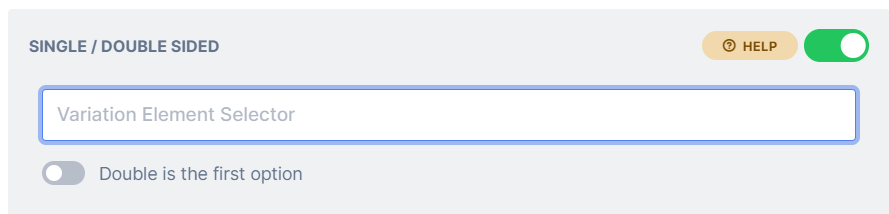
Related articles
Page Count
Sync your product quantity element with the page count of a PitchPrint project.
Shuffle Module
A phone-based layout module for quickly building and editing photo books.
What’s new
2 releases have changed this feature since the article was written.Single/Double sided module with radio inputs
Latest WK06-25 · 7 February 2025 — Previously, this module only functioned with a dropdown field. This approach was used because, by default, we only employ one unique element selector in PitchPrint to link to…
Single or Double Sided Module
WK25-22 · 22 July 2022 — We’ve added an amazing new #Module called Single/Double Sided to our expansive list of modules.