What each item and page tag does, including page-clip, always-top, always-bottom, the pdf tags, grommets and no-mask, and where to add them.
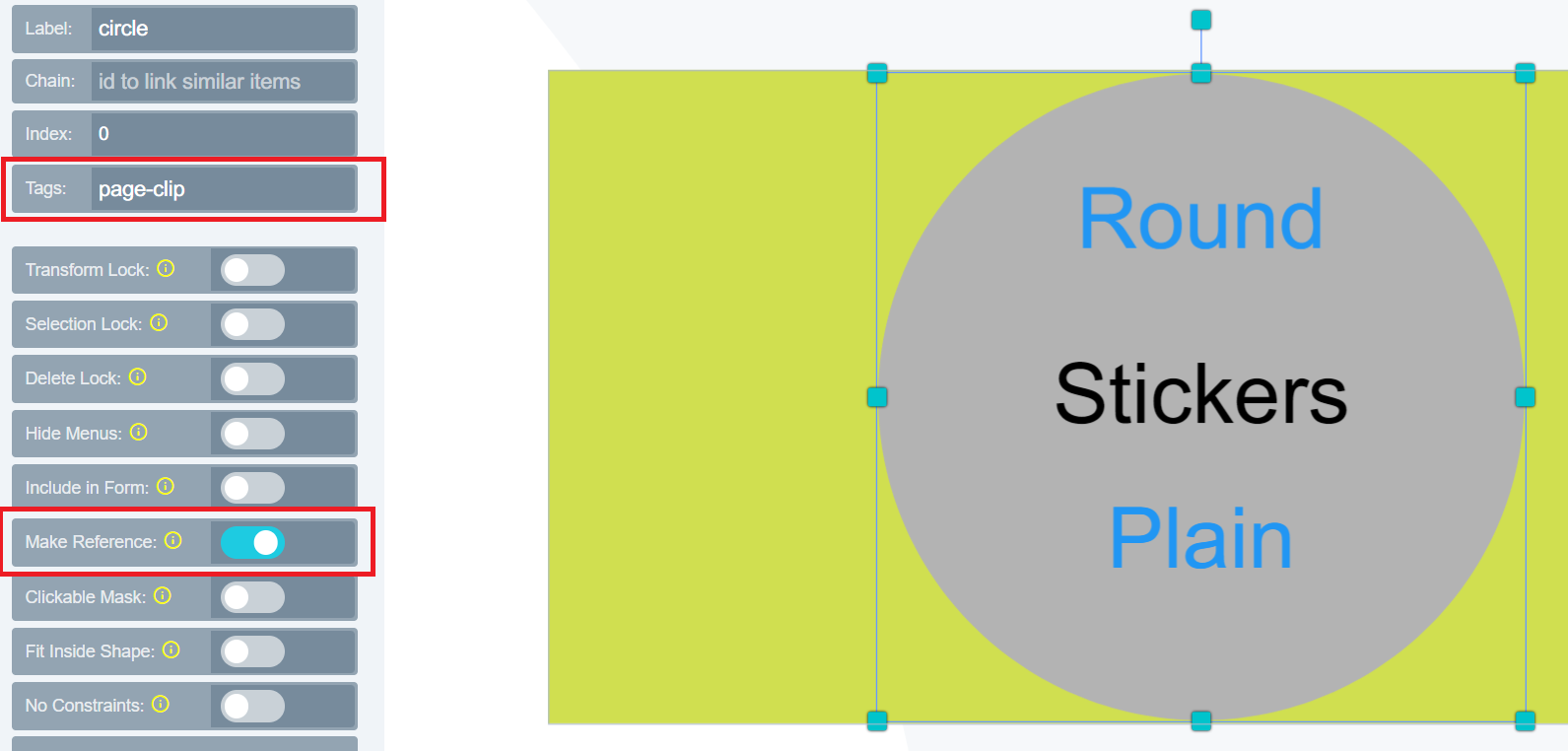
Page Clip: A feature that allows you to add any shape to the canvas and set it as a clip to cut area around the shape in the final PDF.To enable page-clip, click on the shape and go to the ITEM menu tab. Add page-clip to the tag section as shown below and enable make reference.
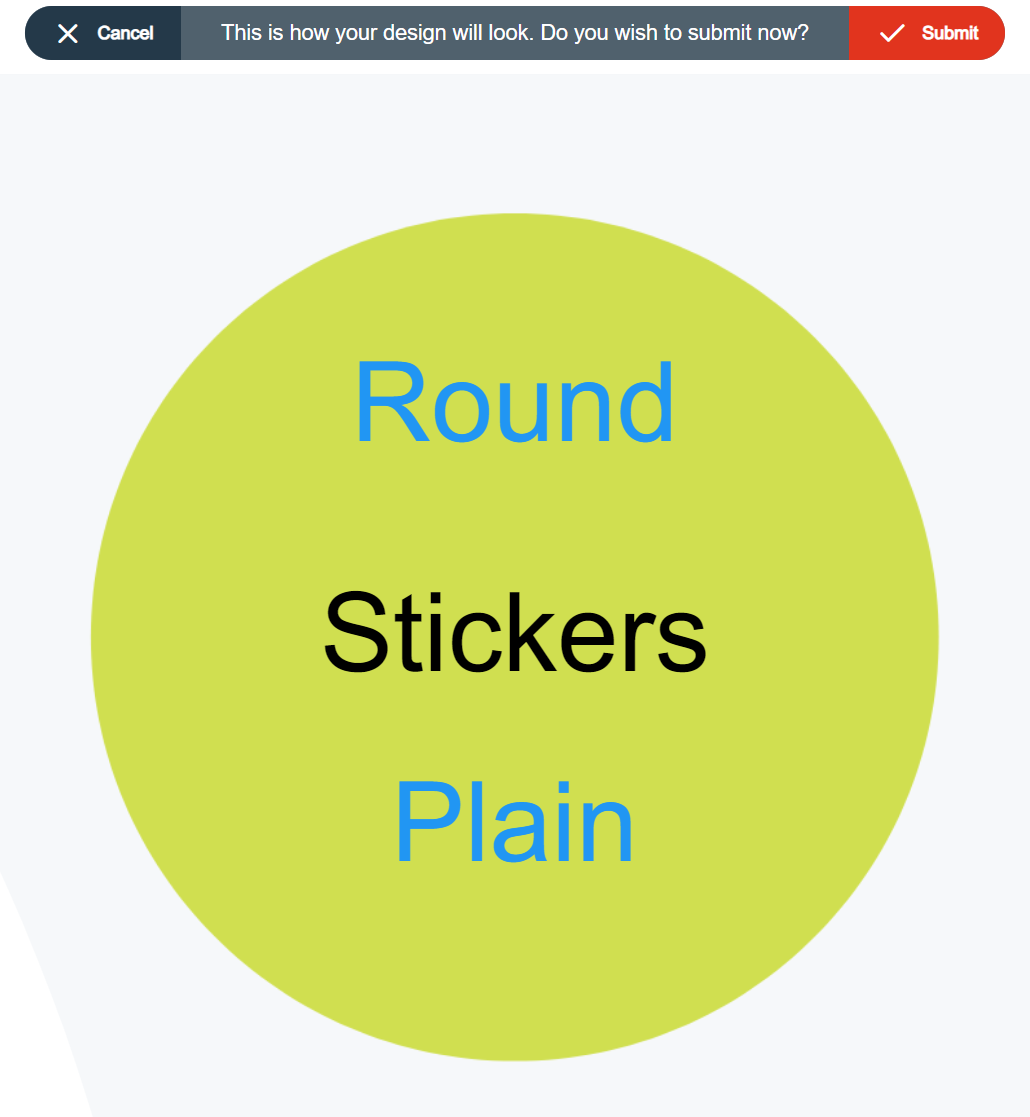
The below image will be the output thereafter:
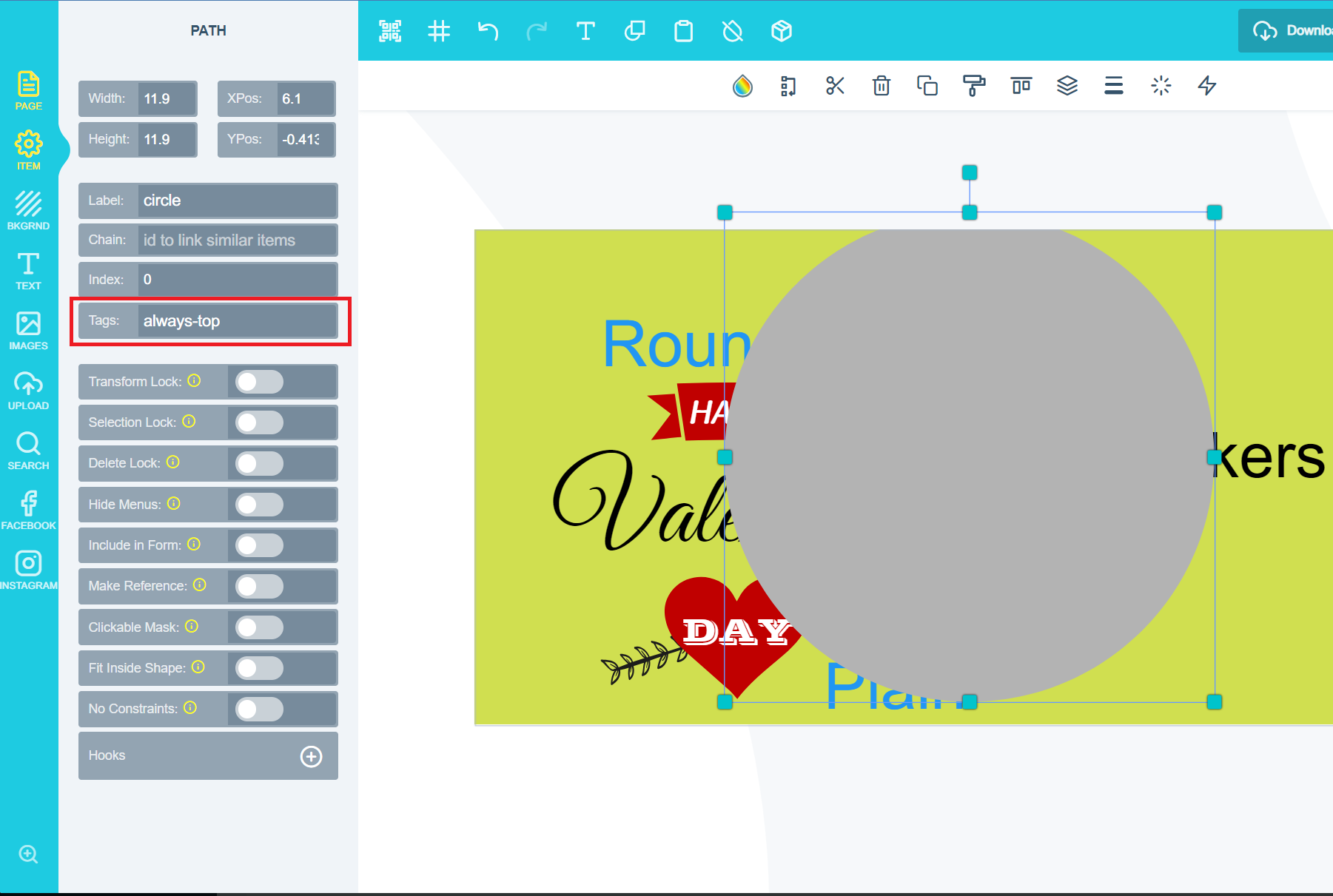
Always Top: Allows you to place an element at the topmost layer of the canvas.To enable always-top add the always-top tag to the tag section as shown below:
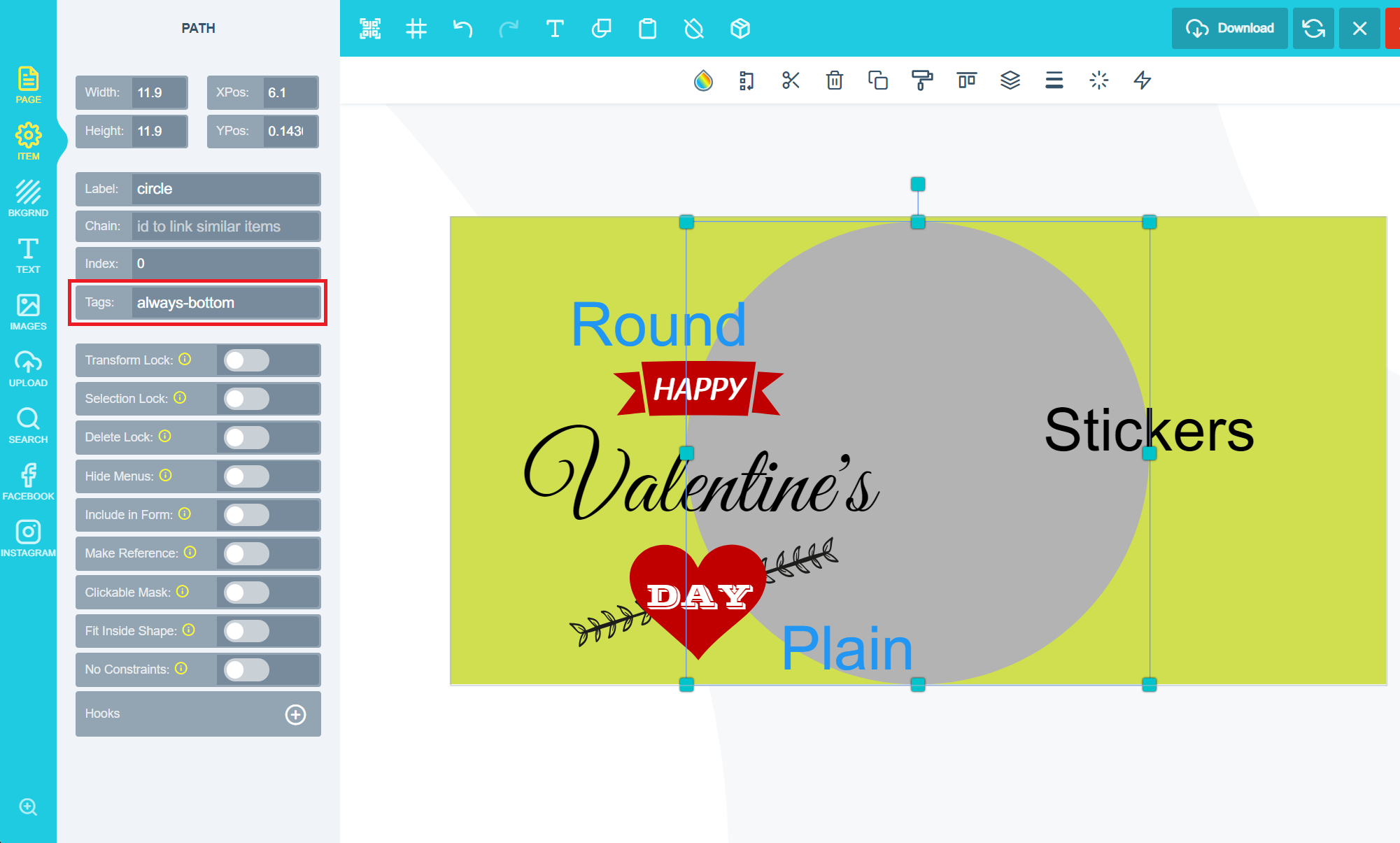
This will result in all other elements moving behind the item selected and that selected element will remain at the top irrespective of edits implemented on the design.Always Bottom: Allows you to place an element in the lowest layer of the canvas.To enable always-bottom add the always-bottom tag to the tag section as shown below:
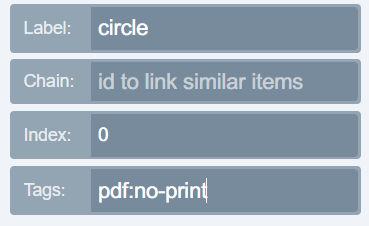
This will result in all other elements moving in front the item and selected item will always remain at the bottom.PDF no-print - The item will not be displayed on the printed file. To enable pdf: no-print add the following tag shown below:
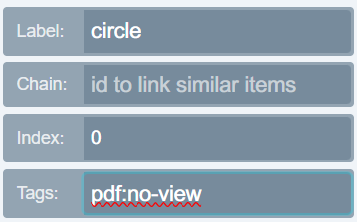
PDF no-view - The item cannot be viewed when you open the PDF inside any PDF viewing application. To enable pdf: no-view add the following tag shown below:
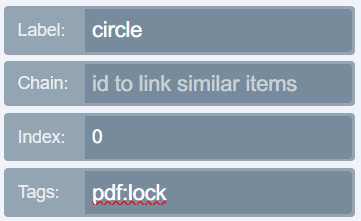
PDF lock - The item cannot be moved when editing the PDF. To enable pdf: lock add the following tag shown below:
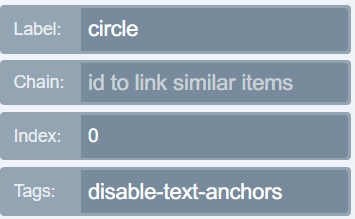
Disable Text anchors: This tag will disable the text anchors when applied to a text field. To enable disable text anchors please add the following tag shown below:
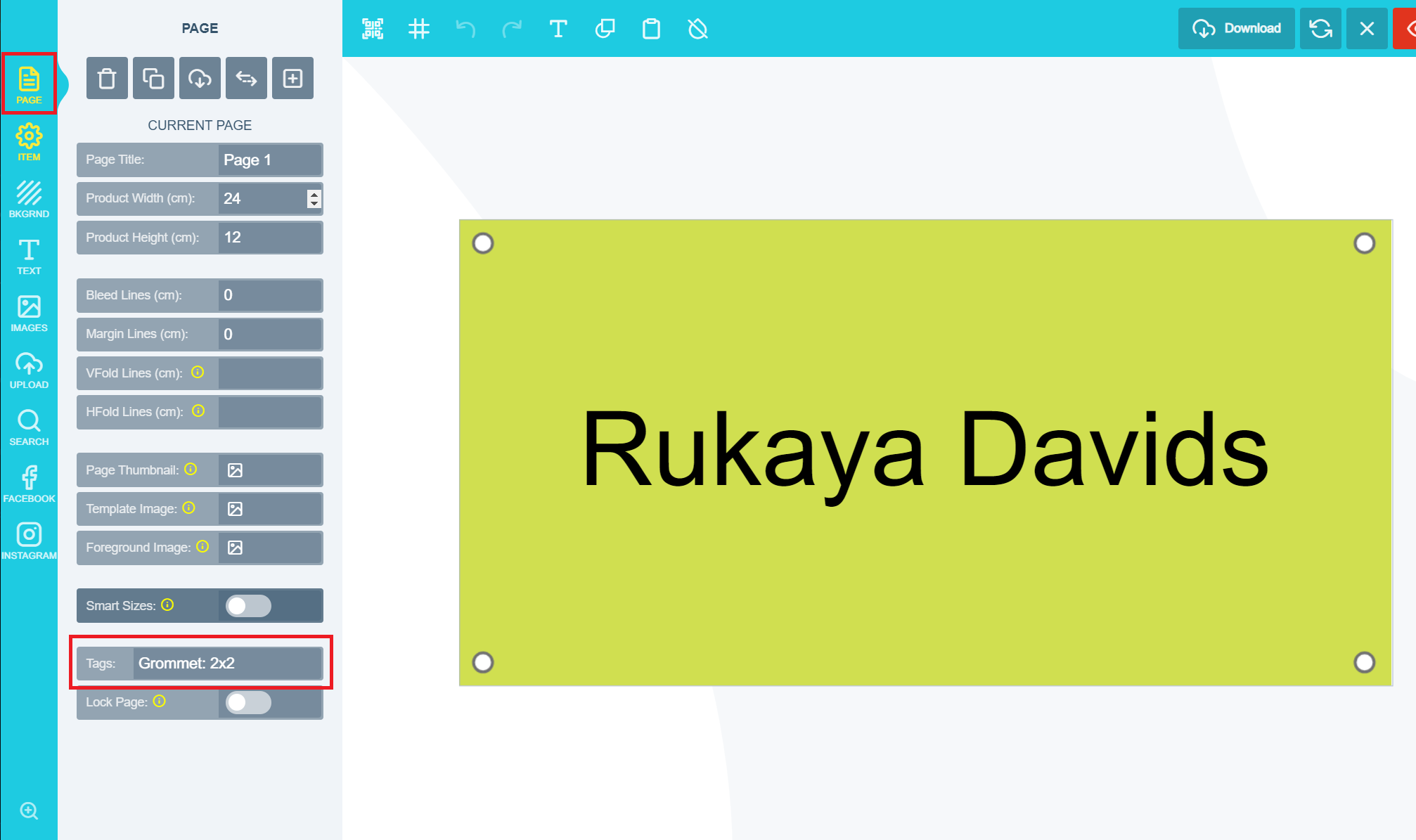
Grommets: A reinforcement hole either horizontally or vertically used to insulate a rope or cable passed through it. A great way to protect the design material from tearing or abrasion. To enable grommets please follow the steps below:Go to the page section as shown below and enable the Grommet on the page tags:
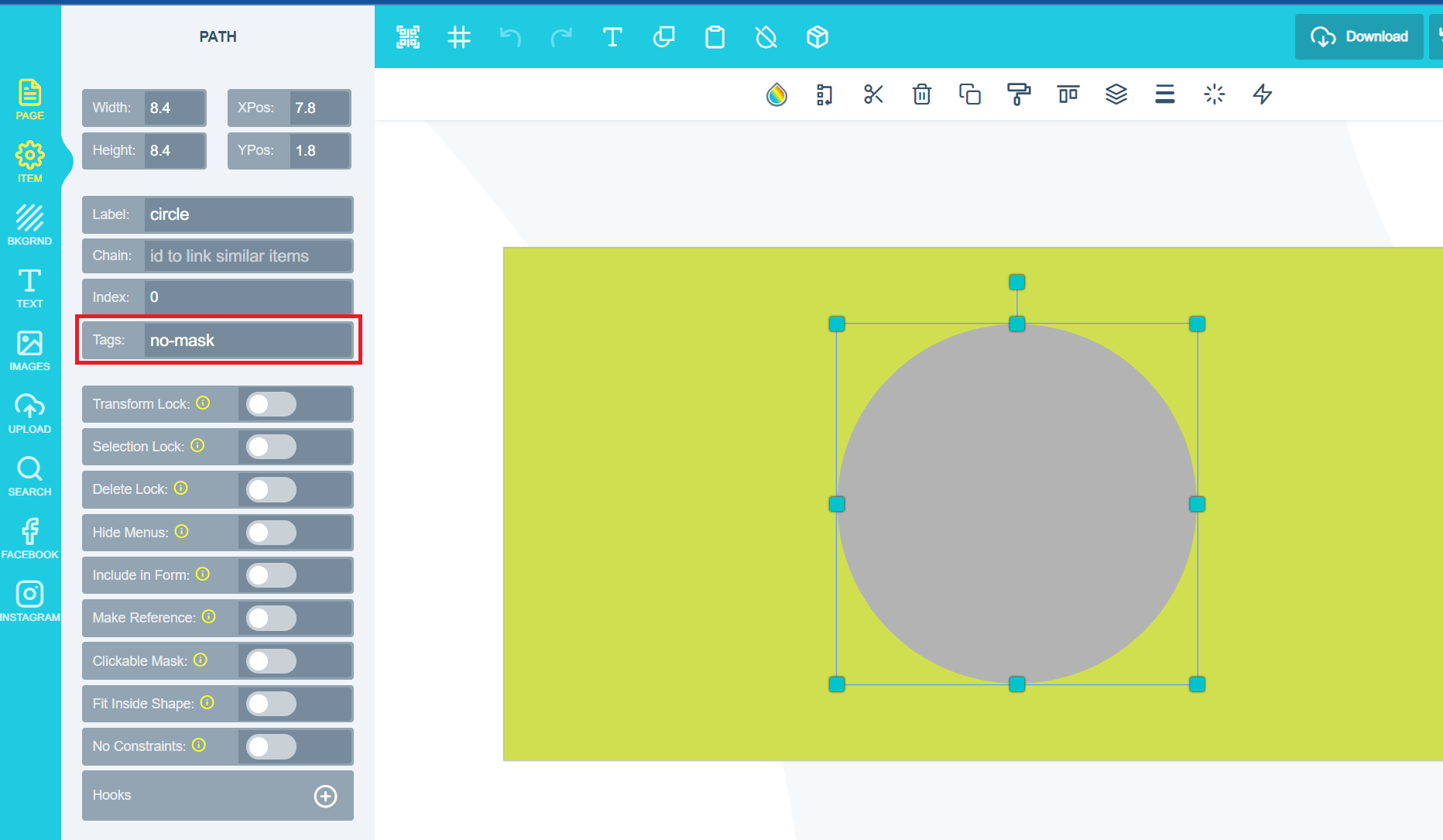
Add the tag as indicated on the screenshot above.Kindly note for Horizontal values, any value can be added as for Vertical only 1 OR 2 may be used. Please note that any changes made to the top of the page will be automatically added to the bottom as well.No-mask: Allows you to stop a shape from being used as an image placeholder. Any shape added to the canvas will be used as an image placeholder by default. If you would like to prevent customers from adding images to shapes on the canvas, you do so by enabling no-mask and it will prevent the shape from being used as an image placeholder.To enable no-mask please add the tag as shown below:
How PitchPrint tags activate features on a design and the list of supported tags.
{"docsConfig":{"theme":"mint","$schema":"https://mintlify.com/docs.json","name":"PitchPrint","colors":{"primary":"#6022E7","light":"#8B5CF6","dark":"#4C1BC4"},"logo":{"light":"https://mintcdn.com/pitchprint/lFqp-OsyXnf1Fc9b/brand/logo/light.svg?fit=max\u0026auto=format\u0026n=lFqp-OsyXnf1Fc9b\u0026q=85\u0026s=ec857289e0ade69316f8eff623821ad8","dark":"https://mintcdn.com/pitchprint/lFqp-OsyXnf1Fc9b/brand/logo/dark.svg?fit=max\u0026auto=format\u0026n=lFqp-OsyXnf1Fc9b\u0026q=85\u0026s=504b6c4556dad8a811dd61d2b802ecce"},"favicon":"https://mintcdn.com/pitchprint/lFqp-OsyXnf1Fc9b/brand/favicon.svg?fit=max\u0026auto=format\u0026n=lFqp-OsyXnf1Fc9b\u0026q=85\u0026s=b6f4f01ffcc134da4657f0b0d0a1b395","navbar":{"links":[{"href":"https://pitchprint.com","label":"Website"}],"primary":{"type":"button","label":"Dashboard","href":"https://admin.pitchprint.com/login"}},"footer":{"socials":{"x":"https://x.com/pitchprint","github":"https://github.com/pitchprint","linkedin":"https://linkedin.com/company/pitchprint"},"links":[{"header":"Product","items":[{"label":"PitchPrint","href":"https://pitchprint.com"},{"label":"Dashboard","href":"https://pitchprint.com/dashboard"}]},{"header":"Blog","items":[{"label":"Articles","href":"/blog/posts/ai-studio"},{"label":"Releases","href":"/blog/releases/2026"}]}]},"errors":{"404":{"redirect":false,"title":"Page not found","description":"This page may have moved when we rebuilt the docs. Try [search](/docs), the [installation guides](/docs/documentation/which-framework-should-i-pick), or the [API reference](/docs/api-reference/introduction). Still stuck? Email [support@pitchprint.com](mailto:support@pitchprint.com)."}},"contextual":{"options":["copy","view","chatgpt","claude","perplexity","mcp","cursor","vscode"],"display":"header"},"styling":{"latex":true},"navigation":{"global":{"anchors":[{"anchor":"Demos","icon":"circle-play","href":"https://wp.demo.pitchprint.io"},{"anchor":"Support","icon":"envelope","href":"mailto:support@pitchprint.com"}]},"pages":[]}},"deployment":{"deploymentMetadataValue":{"subdomain":"pitchprint","hasAudioNarration":false,"actualSubdomain":"pitchprint","customDomains":["pitchprint.com"],"gitSource":{"type":"github","owner":"pitchprint","repo":"docs","deployBranch":"main","contentDirectory":"","isPrivate":false,"mountPath":"","label":""},"chroma":{"collectionId":"8b3f5e9d-7001-4a57-9541-4a2322cc6249","liveDeploymentHistoryId":"6ad5d0509685d528bc7fa825","schemaVersion":"v3","latestBuiltDeploymentHistoryId":"6ad5d0509685d528bc7fa825"},"entitlements":{"AI_CHAT":{"status":"DISABLED"}},"buildId":"6ae07d5c01e51dac894edfaf","clientVersion":"0.0.3971","searchFilterCounts":[{"language":"default","tag":"Documentation","count":154},{"language":"default","tag":"Tutorial","count":91},{"language":"default","tag":"Blog","count":39},{"language":"default","tag":"Tips 'n Tricks","count":32},{"language":"default","tag":"Admin Guide","count":27},{"language":"default","tag":"Using Modules","count":20},{"language":"default","tag":"API Reference","count":19},{"language":"default","tag":"Articles","count":14},{"language":"default","tag":"Installation Guide","count":12},{"language":"default","tag":"Sample Solutions","count":11}]},"assistantConfig":{"enableAskAiButton":false,"enableStarterQuestions":false,"enableContextualStarterQuestions":false,"enableAskAiSearchBar":true},"basePath":"","hasChatPermissions":false,"hasWebMcpPermissions":false,"toggles":[{"name":"kill-isr","enabled":true,"variant":{"name":"disabled","enabled":false,"feature_enabled":true},"impressionData":false},{"name":"agent-mintlify-slack","enabled":true,"variant":{"name":"disabled","enabled":false,"feature_enabled":true},"impressionData":false},{"name":"editor-v7-file-tree","enabled":true,"variant":{"name":"disabled","enabled":false,"feature_enabled":true},"impressionData":false},{"name":"agent-integrations-settings","enabled":true,"variant":{"name":"disabled","enabled":false,"feature_enabled":true},"impressionData":false},{"name":"automations-pr-grouping","enabled":true,"variant":{"name":"disabled","enabled":false,"feature_enabled":true},"impressionData":false},{"name":"custom-prefix","enabled":true,"variant":{"name":"disabled","enabled":false,"feature_enabled":true},"impressionData":false},{"name":"analytics-v7","enabled":true,"variant":{"name":"disabled","enabled":false,"feature_enabled":true},"impressionData":false},{"name":"user-flows-analytics","enabled":true,"variant":{"name":"disabled","enabled":false,"feature_enabled":true},"impressionData":false},{"name":"no-publish-flow","enabled":true,"variant":{"name":"disabled","enabled":false,"feature_enabled":true},"impressionData":false},{"name":"workos-onboarding","enabled":true,"variant":{"name":"disabled","enabled":false,"feature_enabled":true},"impressionData":false},{"name":"llms-txt-v2","enabled":true,"variant":{"name":"disabled","enabled":false,"feature_enabled":true},"impressionData":false},{"name":"pause-universal-search-reconcile","enabled":true,"variant":{"name":"disabled","enabled":false,"feature_enabled":true},"impressionData":false},{"name":"snapshot-serving-live","enabled":true,"variant":{"name":"disabled","enabled":false,"feature_enabled":true},"impressionData":false},{"name":"stripTemperatureMiddleware","enabled":true,"variant":{"name":"disabled","enabled":false,"feature_enabled":true},"impressionData":false},{"name":"per-site-search-delta","enabled":true,"variant":{"name":"disabled","enabled":false,"feature_enabled":true},"impressionData":false},{"name":"support-platform-pylon-zendesk","enabled":true,"variant":{"name":"disabled","enabled":false,"feature_enabled":true},"impressionData":false},{"name":"snapshot-serving","enabled":true,"variant":{"name":"disabled","enabled":false,"feature_enabled":true},"impressionData":false},{"name":"instant-rollback","enabled":true,"variant":{"name":"disabled","enabled":false,"feature_enabled":true},"impressionData":false},{"name":"granular-notifications-server","enabled":true,"variant":{"name":"disabled","enabled":false,"feature_enabled":true},"impressionData":false},{"name":"granular-notifications","enabled":true,"variant":{"name":"disabled","enabled":false,"feature_enabled":true},"impressionData":false},{"name":"editor-private-page-search","enabled":true,"variant":{"name":"disabled","enabled":false,"feature_enabled":true},"impressionData":false},{"name":"automations-fable","enabled":true,"variant":{"name":"disabled","enabled":false,"feature_enabled":true},"impressionData":false},{"name":"fixed-ai-action-pricing","enabled":true,"variant":{"name":"disabled","enabled":false,"feature_enabled":true},"impressionData":false},{"name":"automation-resolve-merge-conflict","enabled":true,"variant":{"name":"disabled","enabled":false,"feature_enabled":true},"impressionData":false},{"name":"scoped-publishing","enabled":true,"variant":{"name":"disabled","enabled":false,"feature_enabled":true},"impressionData":false},{"name":"mintql","enabled":true,"variant":{"name":"disabled","enabled":false,"feature_enabled":true},"impressionData":false},{"name":"page-level-analytics","enabled":true,"variant":{"name":"disabled","enabled":false,"feature_enabled":true},"impressionData":false},{"name":"editor-version-history-v2","enabled":true,"variant":{"name":"disabled","enabled":false,"feature_enabled":true},"impressionData":false},{"name":"editor-nav-generations","enabled":true,"variant":{"name":"disabled","enabled":false,"feature_enabled":true},"impressionData":false},{"name":"billing-page-v2","enabled":true,"variant":{"name":"disabled","enabled":false,"feature_enabled":true},"impressionData":false},{"name":"workspace-projects","enabled":true,"variant":{"name":"disabled","enabled":false,"feature_enabled":true},"impressionData":false},{"name":"assistant-v5","enabled":true,"variant":{"name":"disabled","enabled":false,"feature_enabled":true},"impressionData":false},{"name":"byok-sep-25","enabled":true,"variant":{"name":"disabled","enabled":false,"feature_enabled":true},"impressionData":false},{"name":"fork-pr-previews","enabled":true,"variant":{"name":"disabled","enabled":false,"feature_enabled":true},"impressionData":false},{"name":"revalidation-jwt","enabled":true,"variant":{"name":"disabled","enabled":false,"feature_enabled":true},"impressionData":false},{"name":"vite-origin","enabled":true,"variant":{"name":"disabled","enabled":false,"feature_enabled":true},"impressionData":false},{"name":"editor-agent-model-picker","enabled":true,"variant":{"name":"disabled","enabled":false,"feature_enabled":true},"impressionData":false},{"name":"billing-updated-9-15","enabled":true,"variant":{"name":"disabled","enabled":false,"feature_enabled":true},"impressionData":false},{"name":"workos-sso-scim","enabled":true,"variant":{"name":"disabled","enabled":false,"feature_enabled":true},"impressionData":false},{"name":"hobby-abuse-scan","enabled":true,"variant":{"name":"disabled","enabled":false,"feature_enabled":true},"impressionData":false},{"name":"dashboard-inbox","enabled":true,"variant":{"name":"disabled","enabled":false,"feature_enabled":true},"impressionData":false},{"name":"workos-signup","enabled":true,"variant":{"name":"disabled","enabled":false,"feature_enabled":true},"impressionData":false},{"name":"workos-enabled","enabled":true,"variant":{"name":"disabled","enabled":false,"feature_enabled":true},"impressionData":false}],"isAtlas":false,"googleFontsInlined":false},"customCss":[{"filePath":"style.css","content":"header button[aria-haspopup=menu],nav button[aria-haspopup=menu]{display:none!important}"}],"page":{"pagePath":"docs/tutorial/design-item-and-page-tags","slug":"/docs/tutorial/design-item-and-page-tags","pageMetadata":{"title":"Design Item and Page Tags","description":"What each item and page tag does, including page-clip, always-top, always-bottom, the pdf tags, grommets and no-mask, and where to add them.","href":"/docs/tutorial/design-item-and-page-tags"},"description":{"compiledSource":"\"use strict\";\nconst {jsx: _jsx} = arguments[0];\nconst {useMDXComponents: _provideComponents} = arguments[0];\nfunction _createMdxContent(props) {\n const _components = {\n p: \"p\",\n ..._provideComponents(),\n ...props.components\n };\n return _jsx(_components.p, {\n children: \"What each item and page tag does, including page-clip, always-top, always-bottom, the pdf tags, grommets and no-mask, and where to add them.\"\n });\n}\nfunction MDXContent(props = {}) {\n const {wrapper: MDXLayout} = {\n ..._provideComponents(),\n ...props.components\n };\n return MDXLayout ? _jsx(MDXLayout, {\n ...props,\n children: _jsx(_createMdxContent, {\n ...props\n })\n }) : _createMdxContent(props);\n}\nreturn {\n default: MDXContent\n};\n","frontmatter":{},"scope":{}},"pageType":"default","mdx":{"mdxSource":{"compiledSource":"\"use strict\";const{Fragment:_Fragment,jsx:_jsx,jsxs:_jsxs}=arguments[0];const{useMDXComponents:_provideComponents}=arguments[0];function _createMdxContent(props){const _components={em:`em`,p:`p`,strong:`strong`,..._provideComponents(),...props.components},{Card,CardGroup,Frame,Heading,OptimizedImage}=_components;if(!Card)_missingMdxReference(`Card`,true);if(!CardGroup)_missingMdxReference(`CardGroup`,true);if(!Frame)_missingMdxReference(`Frame`,true);if(!Heading)_missingMdxReference(`Heading`,true);if(!OptimizedImage)_missingMdxReference(`OptimizedImage`,true);return _jsxs(_Fragment,{children:[_jsxs(_components.p,{children:[_jsx(_components.strong,{children:`Page Clip:`}),` A feature that allows you to add any shape to the canvas and set it as a clip to cut area around the shape in the final PDF.`]}),`\n`,_jsxs(_components.p,{children:[`To enable page-clip, click on the shape and go to the ITEM menu tab. Add `,_jsx(_components.em,{children:_jsx(_components.strong,{children:`page-clip`})}),` to the tag section as shown below and enable make reference.`]}),`\n`,_jsx(Frame,{children:_jsx(OptimizedImage,{src:`https://s3.amazonaws.com/helpscout.net/docs/assets/58f1ec6d2c7d3a52b42f8254/images/65099e4b96b8220e08ace215/file-5DQChhpROs.png`,alt:`ITEM menu tab with page-clip entered in the tag section and make reference enabled`})}),`\n`,_jsx(_components.p,{children:`The below image will be the output thereafter:`}),`\n`,_jsx(Frame,{children:_jsx(OptimizedImage,{src:`https://s3.amazonaws.com/helpscout.net/docs/assets/58f1ec6d2c7d3a52b42f8254/images/65099e7096b8220e08ace216/file-uGRm7hnLOl.png`,alt:`Final PDF output cut to the outline of the page-clip shape`})}),`\n`,_jsxs(_components.p,{children:[_jsx(_components.strong,{children:`Always Top:`}),` Allows you to place an element at the topmost layer of the canvas.`]}),`\n`,_jsxs(_components.p,{children:[`To enable always-top add the `,_jsx(_components.em,{children:_jsx(_components.strong,{children:`always-top`})}),` tag to the tag section as shown below:`]}),`\n`,_jsx(Frame,{children:_jsx(OptimizedImage,{src:`https://s3.amazonaws.com/helpscout.net/docs/assets/58f1ec6d2c7d3a52b42f8254/images/6509a06f302287021e634a1e/file-jcuAhWc1Uc.png`,alt:`Tag section of the item panel with the always-top tag added`})}),`\n`,_jsx(_components.p,{children:`This will result in all other elements moving behind the item selected and that selected element will remain at the top irrespective of edits implemented on the design.`}),`\n`,_jsxs(_components.p,{children:[_jsx(_components.strong,{children:`Always Bottom:`}),` Allows you to place an element in the lowest layer of the canvas.`]}),`\n`,_jsxs(_components.p,{children:[`To enable always-bottom add the `,_jsx(_components.em,{children:_jsx(_components.strong,{children:`always-bottom`})}),` tag to the tag section as shown below:`]}),`\n`,_jsx(Frame,{children:_jsx(OptimizedImage,{src:`https://s3.amazonaws.com/helpscout.net/docs/assets/58f1ec6d2c7d3a52b42f8254/images/6509a276e249755d2f85c270/file-uaE9GOK9Tg.png`,alt:`Tag section of the item panel with the always-bottom tag added`})}),`\n`,_jsx(_components.p,{children:`This will result in all other elements moving in front the item and selected item will always remain at the bottom.`}),`\n`,_jsxs(_components.p,{children:[_jsx(_components.strong,{children:`PDF no-print`}),` - The item will not be displayed on the printed file. To enable pdf: no-print add the following tag shown below:`]}),`\n`,_jsx(Frame,{children:_jsx(OptimizedImage,{src:`https://s3.amazonaws.com/helpscout.net/docs/assets/58f1ec6d2c7d3a52b42f8254/images/6509a338b57bfa3b524b12a2/file-u9wZLeqyEm.png`,alt:`Tag section of the item panel with the pdf: no-print tag added`})}),`\n`,_jsxs(_components.p,{children:[_jsx(_components.strong,{children:`PDF no-view`}),` - The item cannot be viewed when you open the PDF inside any PDF viewing application. To enable pdf: no-view add the following tag shown below:`]}),`\n`,_jsx(Frame,{children:_jsx(OptimizedImage,{src:`https://s3.amazonaws.com/helpscout.net/docs/assets/58f1ec6d2c7d3a52b42f8254/images/6509a35b96b8220e08ace219/file-MmkbTuV37m.png`,alt:`Tag section of the item panel with the pdf: no-view tag added`})}),`\n`,_jsxs(_components.p,{children:[_jsx(_components.strong,{children:`PDF lock`}),` - The item cannot be moved when editing the PDF. To enable pdf: lock add the following tag shown below:`]}),`\n`,_jsx(Frame,{children:_jsx(OptimizedImage,{src:`https://s3.amazonaws.com/helpscout.net/docs/assets/58f1ec6d2c7d3a52b42f8254/images/6509a39e96b8220e08ace21b/file-IWNgYDGhCW.png`,alt:`Tag section of the item panel with the pdf: lock tag added`})}),`\n`,_jsxs(_components.p,{children:[_jsx(_components.strong,{children:`Disable Text anchors`}),`: This tag will disable the text anchors when applied to a text field. To enable disable text anchors please add the following tag shown below:`]}),`\n`,_jsx(Frame,{children:_jsx(OptimizedImage,{src:`https://s3.amazonaws.com/helpscout.net/docs/assets/58f1ec6d2c7d3a52b42f8254/images/6509a3f0302287021e634a2b/file-6qFgLTBq3n.png`,alt:`Tag section of a text item with the tag that disables text anchors added`})}),`\n`,_jsxs(_components.p,{children:[_jsx(_components.strong,{children:`Grommets:`}),` A reinforcement hole either horizontally or vertically used to insulate a rope or cable passed through it. A great way to protect the design material from tearing or abrasion. To enable grommets please follow the steps below:`]}),`\n`,_jsx(_components.p,{children:`Go to the page section as shown below and enable the Grommet on the page tags:`}),`\n`,_jsx(Frame,{children:_jsx(OptimizedImage,{src:`https://s3.amazonaws.com/helpscout.net/docs/assets/58f1ec6d2c7d3a52b42f8254/images/6509a8d1b57bfa3b524b12ba/file-VyJ5IOgNGA.png`,alt:`Page section with the grommet tag added to the page tags, showing horizontal and vertical values`})}),`\n`,_jsx(_components.p,{children:`Add the tag as indicated on the screenshot above.`}),`\n`,_jsx(_components.p,{children:`Kindly note for Horizontal values, any value can be added as for Vertical only 1 OR 2 may be used. Please note that any changes made to the top of the page will be automatically added to the bottom as well.`}),`\n`,_jsxs(_components.p,{children:[_jsx(_components.strong,{children:`No-mask:`}),` Allows you to stop a shape from being used as an image placeholder. Any shape added to the canvas will be used as an image placeholder by default. If you would like to prevent customers from adding images to shapes on the canvas, you do so by enabling `,_jsx(_components.em,{children:`no-mask`}),` and it will prevent the shape from being used as an image placeholder.`]}),`\n`,_jsx(_components.p,{children:`To enable no-mask please add the tag as shown below:`}),`\n`,_jsx(Frame,{children:_jsx(OptimizedImage,{src:`https://s3.amazonaws.com/helpscout.net/docs/assets/58f1ec6d2c7d3a52b42f8254/images/6509aa19302287021e634a36/file-KWAOfQA8mA.png`,alt:`Tag section of a shape with the no-mask tag added`})}),`\n`,_jsx(Heading,{level:`2`,id:`related-articles`,children:`Related articles`}),`\n`,_jsx(CardGroup,{cols:2,children:_jsx(Card,{title:`Tags`,icon:`tag`,href:`/docs/documentation/tags`,children:_jsx(_components.p,{children:`How PitchPrint tags activate features on a design and the list of supported tags.`})})})]})}function MDXContent(props={}){const{wrapper:MDXLayout}={..._provideComponents(),...props.components};return MDXLayout?_jsx(MDXLayout,{...props,children:_jsx(_createMdxContent,{...props})}):_createMdxContent(props)}return{default:MDXContent};function _missingMdxReference(id,component){throw new Error(`Expected `+(component?`component`:`object`)+\" `\"+id+\"` to be defined: you likely forgot to import, pass, or provide it.\")}","frontmatter":{},"scope":{"config":{},"pageMetadata":{"title":"Design Item and Page Tags","description":"What each item and page tag does, including page-clip, always-top, always-bottom, the pdf tags, grommets and no-mask, and where to add them.","href":"/docs/tutorial/design-item-and-page-tags"}}},"mdxSourceWithNoJs":null},"mdxExtracts":{"tableOfContents":[{"title":"Related articles","slug":"related-articles","depth":2,"children":[]}],"codeExamples":{}},"jsLinks":["/_mintlify/custom/pitchprint/886e30c9af4224f6/scripts/convert-to-markdown.js","/_mintlify/custom/pitchprint/c953c1c1f34b6af4/scripts/example.js","/_mintlify/custom/pitchprint/14cc91d930d58432/scripts/helpscout.js","/_mintlify/custom/pitchprint/8f78fad523c4930d/scripts/publish-to-docs.js","/_mintlify/custom/pitchprint/8be7daf1bdca8db0/scripts/generate-blog-summaries.js","/_mintlify/custom/pitchprint/fc72494a10805019/scripts/ingest-new.js","/_mintlify/custom/pitchprint/dec987e667653622/scripts/report-drift.js","/_mintlify/custom/pitchprint/e456009a2e9f0ad5/scripts/registry.js","/_mintlify/custom/pitchprint/13fc4b20d6eac8f8/scripts/fetch-blog-releases.js"],"subdomain":"pitchprint","siteName":"PitchPrint","title":"Design Item and Page Tags - PitchPrint","navMaps":{"firstHrefInVersion":{},"firstHrefInLanguage":{}},"lastModified":"2026-08-17T19:31:59.274Z","originalFileLocation":"docs/tutorial/design-item-and-page-tags.mdx"},"headHtml":"\u003cscript data-mint-head>(function(){var d=document.documentElement,p=null;if(!p){try{p=localStorage.getItem(\"isDarkMode\")}catch(e){}if(p==='true')p='dark';else if(p==='false')p='light';if(p!=='light'\u0026\u0026p!=='dark'\u0026\u0026p!=='system')p=\"system\"}var r=p==='system'?(matchMedia(\"(prefers-color-scheme: dark)\").matches?'dark':'light'):p;d.classList.remove(r==='dark'?'light':'dark');d.classList.add(r);d.setAttribute(\"data-theme-preference\",p)})();\u003c/script>\u003cmeta data-mint-head name=\"description\" content=\"What each item and page tag does, including page-clip, always-top, always-bottom, the pdf tags, grommets and no-mask, and where to add them.\">\u003cmeta data-mint-head name=\"application-name\" content=\"PitchPrint\">\u003cmeta data-mint-head name=\"generator\" content=\"Mintlify\">\u003clink data-mint-head rel=\"icon\" type=\"image/png\" sizes=\"192x192\" href=\"/mintlify-assets/_mintlify/favicons/pitchprint/6gqAs1_dwfh54HA4/_generated/favicon/android-chrome-192x192.png\" media=\"(prefers-color-scheme: light)\">\u003clink data-mint-head rel=\"apple-touch-icon\" type=\"image/png\" sizes=\"180x180\" href=\"/mintlify-assets/_mintlify/favicons/pitchprint/6gqAs1_dwfh54HA4/_generated/favicon/apple-touch-icon.png\">\u003clink data-mint-head rel=\"icon\" type=\"image/png\" sizes=\"16x16\" href=\"/mintlify-assets/_mintlify/favicons/pitchprint/6gqAs1_dwfh54HA4/_generated/favicon/favicon-16x16.png\" media=\"(prefers-color-scheme: light)\">\u003clink data-mint-head rel=\"icon\" type=\"image/png\" sizes=\"32x32\" href=\"/mintlify-assets/_mintlify/favicons/pitchprint/6gqAs1_dwfh54HA4/_generated/favicon/favicon-32x32.png\" media=\"(prefers-color-scheme: light)\">\u003clink data-mint-head rel=\"shortcut icon\" type=\"image/x-icon\" href=\"/mintlify-assets/_mintlify/favicons/pitchprint/6gqAs1_dwfh54HA4/_generated/favicon/favicon.ico\" media=\"(prefers-color-scheme: light)\">\u003clink data-mint-head rel=\"icon\" type=\"image/png\" sizes=\"192x192\" href=\"/mintlify-assets/_mintlify/favicons/pitchprint/6gqAs1_dwfh54HA4/_generated/favicon-dark/android-chrome-192x192.png\" media=\"(prefers-color-scheme: dark)\">\u003clink data-mint-head rel=\"icon\" type=\"image/png\" sizes=\"16x16\" href=\"/mintlify-assets/_mintlify/favicons/pitchprint/6gqAs1_dwfh54HA4/_generated/favicon-dark/favicon-16x16.png\" media=\"(prefers-color-scheme: dark)\">\u003clink data-mint-head rel=\"icon\" type=\"image/png\" sizes=\"32x32\" href=\"/mintlify-assets/_mintlify/favicons/pitchprint/6gqAs1_dwfh54HA4/_generated/favicon-dark/favicon-32x32.png\" media=\"(prefers-color-scheme: dark)\">\u003clink data-mint-head rel=\"shortcut icon\" type=\"image/x-icon\" href=\"/mintlify-assets/_mintlify/favicons/pitchprint/6gqAs1_dwfh54HA4/_generated/favicon-dark/favicon.ico\" media=\"(prefers-color-scheme: dark)\">\u003cmeta data-mint-head property=\"og:title\" content=\"Design Item and Page Tags - PitchPrint\">\u003cmeta data-mint-head property=\"og:description\" content=\"What each item and page tag does, including page-clip, always-top, always-bottom, the pdf tags, grommets and no-mask, and where to add them.\">\u003cmeta data-mint-head property=\"og:site_name\" content=\"PitchPrint\">\u003cmeta data-mint-head property=\"og:url\" content=\"https://pitchprint.com/docs/tutorial/design-item-and-page-tags\">\u003cmeta data-mint-head property=\"og:type\" content=\"website\">\u003cmeta data-mint-head property=\"og:image\" content=\"https://pitchprint.mintlify.app/_mintlify/api/og/v2?division=Tags+%26+Items\u0026amp;title=Design+Item+and+Page+Tags\u0026amp;description=What+each+item+and+page+tag+does%2C+including+page-clip%2C+always-top%2C+always-bottom%2C+the+pdf+tags%2C+grommets+and+no-mask%2C+and+where+to+add+them.\u0026amp;theme=597b42b10e9ef5f4e0b4869a\u0026amp;signature=d9165774791fd636705d832fa3c1af9cd0e0eeea1c65b5e991c7a3d7266bc01c\">\u003cmeta data-mint-head property=\"og:image:width\" content=\"1200\">\u003cmeta data-mint-head property=\"og:image:height\" content=\"630\">\u003cmeta data-mint-head name=\"twitter:card\" content=\"summary_large_image\">\u003cmeta data-mint-head name=\"twitter:title\" content=\"Design Item and Page Tags - PitchPrint\">\u003cmeta data-mint-head name=\"twitter:description\" content=\"What each item and page tag does, including page-clip, always-top, always-bottom, the pdf tags, grommets and no-mask, and where to add them.\">\u003cmeta data-mint-head name=\"twitter:image\" content=\"https://pitchprint.mintlify.app/_mintlify/api/og/v2?division=Tags+%26+Items\u0026amp;title=Design+Item+and+Page+Tags\u0026amp;description=What+each+item+and+page+tag+does%2C+including+page-clip%2C+always-top%2C+always-bottom%2C+the+pdf+tags%2C+grommets+and+no-mask%2C+and+where+to+add+them.\u0026amp;theme=597b42b10e9ef5f4e0b4869a\u0026amp;signature=d9165774791fd636705d832fa3c1af9cd0e0eeea1c65b5e991c7a3d7266bc01c\">\u003cmeta data-mint-head name=\"twitter:image:width\" content=\"1200\">\u003cmeta data-mint-head name=\"twitter:image:height\" content=\"630\">\u003cmeta data-mint-head name=\"msapplication-config\" content=\"/mintlify-assets/_mintlify/favicons/pitchprint/6gqAs1_dwfh54HA4/_generated/favicon/browserconfig.xml\">\u003cmeta data-mint-head name=\"apple-mobile-web-app-title\" content=\"PitchPrint\">\u003cmeta data-mint-head name=\"msapplication-TileColor\" content=\"#6022E7\">\u003clink data-mint-head rel=\"canonical\" href=\"https://pitchprint.com/docs/tutorial/design-item-and-page-tags\">\u003clink data-mint-head rel=\"alternate\" type=\"application/xml\" href=\"/sitemap.xml\">\u003clink data-mint-head rel=\"alternate\" type=\"text/markdown\" href=\"/docs/tutorial/design-item-and-page-tags.md\">\u003cscript data-mint-head type=\"application/ld+json\">{\"@context\":\"https://schema.org\",\"@graph\":[{\"@type\":\"Organization\",\"@id\":\"https://pitchprint.com/#organization\",\"name\":\"PitchPrint\",\"url\":\"https://pitchprint.com\",\"logo\":{\"@type\":\"ImageObject\",\"url\":\"https://mintcdn.com/pitchprint/lFqp-OsyXnf1Fc9b/brand/logo/light.svg?fit=max\u0026auto=format\u0026n=lFqp-OsyXnf1Fc9b\u0026q=85\u0026s=ec857289e0ade69316f8eff623821ad8\"}},{\"@type\":\"WebSite\",\"@id\":\"https://pitchprint.com#website\",\"name\":\"PitchPrint\",\"url\":\"https://pitchprint.com\",\"publisher\":{\"@id\":\"https://pitchprint.com/#organization\"}},{\"@type\":\"WebPage\",\"@id\":\"https://pitchprint.com/docs/tutorial/design-item-and-page-tags#webpage\",\"url\":\"https://pitchprint.com/docs/tutorial/design-item-and-page-tags\",\"name\":\"Design Item and Page Tags\",\"description\":\"What each item and page tag does, including page-clip, always-top, always-bottom, the pdf tags, grommets and no-mask, and where to add them.\",\"dateModified\":\"2026-08-17T19:31:59.274Z\",\"isPartOf\":{\"@id\":\"https://pitchprint.com#website\"},\"breadcrumb\":{\"@id\":\"https://pitchprint.com/docs/tutorial/design-item-and-page-tags#breadcrumb\"}},{\"@type\":\"BreadcrumbList\",\"@id\":\"https://pitchprint.com/docs/tutorial/design-item-and-page-tags#breadcrumb\",\"itemListElement\":[{\"@type\":\"ListItem\",\"position\":1,\"name\":\"Admin Guide\",\"item\":\"https://pitchprint.com/docs/tutorial/getting-started-with-pitchprint\"},{\"@type\":\"ListItem\",\"position\":2,\"name\":\"Design Item and Page Tags\",\"item\":\"https://pitchprint.com/docs/tutorial/design-item-and-page-tags\"}]},{\"@type\":[\"Article\",\"TechArticle\"],\"@id\":\"https://pitchprint.com/docs/tutorial/design-item-and-page-tags#article\",\"headline\":\"Design Item and Page Tags\",\"name\":\"Design Item and Page Tags\",\"description\":\"What each item and page tag does, including page-clip, always-top, always-bottom, the pdf tags, grommets and no-mask, and where to add them.\",\"url\":\"https://pitchprint.com/docs/tutorial/design-item-and-page-tags\",\"mainEntityOfPage\":{\"@id\":\"https://pitchprint.com/docs/tutorial/design-item-and-page-tags#webpage\"},\"dateModified\":\"2026-08-17T19:31:59.274Z\",\"publisher\":{\"@id\":\"https://pitchprint.com/#organization\"},\"isPartOf\":{\"@id\":\"https://pitchprint.com#website\"}}]}\u003c/script>\u003cscript data-mint-head type=\"application/ld+json\">{\"@context\":\"https://schema.org\",\"@type\":\"WebSite\",\"name\":\"PitchPrint\",\"creator\":{\"@type\":\"Organization\",\"name\":\"Mintlify\",\"url\":\"https://mintlify.com\"}}\u003c/script>","siteName":"PitchPrint","nav":{"global":{"anchors":[{"anchor":"Demos","icon":"circle-play","href":"https://wp.demo.pitchprint.io"},{"anchor":"Support","icon":"envelope","href":"mailto:support@pitchprint.com"}]},"products":[{"product":"Documentation","icon":"book","tabs":[{"tab":"Documentation","pages":[{"title":"Documentation","href":"/docs"}]},{"tab":"Tutorial","groups":[{"group":"Overview","pages":[{"title":"Tutorials","href":"/docs/tutorial/overview"}]},{"group":"Admin Guide","pages":[{"group":"Getting Started","pages":[{"title":"Getting started with PitchPrint","href":"/docs/tutorial/getting-started-with-pitchprint"},{"title":"Admin Design Editor","href":"/docs/tutorial/design-editor"},{"title":"Admin Settings","href":"/docs/tutorial/admin-settings"}]},{"group":"Creating Designs","pages":[{"title":"How To Create A Design","href":"/docs/tutorial/how-to-create-a-design"},{"title":"How to import designs","href":"/docs/tutorial/how-to-import-designs"},{"title":"Managing your Designs","href":"/docs/tutorial/managing-your-designs"},{"title":"Design Configuration","href":"/docs/tutorial/design-configuration"},{"title":"Types of PitchPrint design","href":"/docs/tutorial/types-of-pitchprint-designs"}]},{"group":"Design Elements","pages":[{"title":"All About Colors","href":"/docs/tutorial/all-about-colors"},{"title":"Color Palette","href":"/docs/tutorial/color-palette"},{"title":"PP v10 features","href":"/docs/tutorial/backgrounds"},{"title":"Text Styles","href":"/docs/tutorial/text-styles"},{"title":"Custom Mask","href":"/docs/tutorial/custom-mask"},{"title":"Sticky Items","href":"/docs/tutorial/sticky-items"}]},{"group":"Layouts \u0026 Sizing","pages":[{"title":"Layouts (version 10)","href":"/docs/tutorial/layouts-v10"},{"title":"Mobile Phone Layouts","href":"/docs/tutorial/mobile-phone-layouts"},{"title":"Smart Sizes","description":"Hold several canvas sizes and layouts in one design, then let customers pick a size in the app or from a product page selector.","href":"/docs/tutorial/smart-sizes"}]},{"group":"Tags \u0026 Items","pages":[{"title":"Design Item and Page Tags","href":"/docs/tutorial/design-item-and-page-tags"},{"title":"Item Hooks","description":"Bind one item's position to a host item's boundary so targets shift automatically and keep their gap when the host is edited or scaled.","href":"/docs/tutorial/item-hooks"}]},{"group":"Fonts \u0026 Forms","pages":[{"title":"How to add your own fonts","href":"/docs/tutorial/how-to-add-your-own-fonts"},{"title":"How to enable the Customization Form","href":"/docs/tutorial/how-to-enable-the-customization-form"},{"title":"How to create a clickable mask","href":"/docs/tutorial/how-to-create-a-clickable-mask"}]},{"group":"PDF \u0026 Output","pages":[{"title":"PDF Rendering","href":"/docs/tutorial/pdf-rendering"},{"title":"Photo Print Module","href":"/docs/tutorial/photo-print-module"},{"title":"Photo Resolution (DPI) Check","href":"/docs/tutorial/photo-resolution-check"},{"title":"Automation: Sending your PDF file to Printer","href":"/docs/tutorial/automation-sending-your-pdf-file-to-printer"}]},{"title":"Managing your Domains","href":"/docs/tutorial/managing-your-domains"}]},{"group":"Using Modules","pages":[{"group":"Design \u0026 Data","expanded":false,"pages":[{"title":"Design Selector Module","href":"/docs/tutorial/design-selector-module"},{"title":"Data Form Module","href":"/docs/tutorial/data-form-module"},{"title":"Variable Data Module","href":"/docs/tutorial/variable-data-module"},{"title":"Template Color Module","href":"/docs/tutorial/template-color-module"},{"title":"Swatch Module","href":"/docs/tutorial/swatch-module"}]},{"group":"AI Tools","expanded":false,"pages":[{"title":"AI-Imaginate","href":"/docs/tutorial/ai-image-generator"},{"title":"AI Smart Replace","href":"/docs/tutorial/ai-smart-replace"},{"title":"AI Sketch to Image","href":"/docs/tutorial/ai-sketch-to-image"},{"title":"AI Outpainting","href":"/docs/tutorial/ai-outpainting"},{"title":"AI Upscale","href":"/docs/tutorial/ai-upscale"},{"title":"AI Structure","href":"/docs/tutorial/ai-structure"}]},{"group":"Pages \u0026 Layout","expanded":false,"pages":[{"title":"Page Count","href":"/docs/tutorial/how-to-use-page-count-module"},{"title":"Page Loader Module","href":"/docs/tutorial/page-loader-module"},{"title":"Single/Double Sided Module","href":"/docs/tutorial/single-double-sided-module"},{"title":"Shuffle Module","href":"/docs/tutorial/shuffle-module"}]},{"group":"Canvas Adjuster","expanded":false,"pages":[{"title":"Canvas Adjuster Module","href":"/docs/tutorial/canvas-adjuster-module"},{"title":"Integrating Canvas Adjuster To A WordPress Store","href":"/docs/tutorial/integrating-canvas-adjuster-to-a-wordpress-store"},{"title":"Integrating Canvas Adjuster To An OpenCart Store","href":"/docs/tutorial/integrating-canvas-adjuster-to-an-opencart-store"}]},{"group":"Other Modules","expanded":false,"pages":[{"title":"Remix Module","href":"/docs/tutorial/remi-module"},{"title":"Design Observables","href":"/docs/tutorial/design-observables"}]}]},{"group":"Tips 'n Tricks","pages":[{"group":"SVG \u0026 Masks","pages":[{"title":"Creating Designs Using SVGs","href":"/docs/tutorial/creating-designs-using-svgs"},{"title":"How to create an SVG for use as a Mask","href":"/docs/tutorial/how-to-create-an-svg-for-use-as-mask"},{"title":"How to create templates using SVG shapes","href":"/docs/tutorial/how-to-create-templates-using-svg-shapes"},{"title":"How to save your SVGs for use in PitchPrint","href":"/docs/tutorial/how-to-save-your-svgs-for-use-in-pitchprint"},{"title":"SVG to Text","href":"/docs/tutorial/text-to-svg"}]},{"group":"Colour Chains","pages":[{"title":"Colour Chain","href":"/docs/tutorial/element-colour-chain"},{"title":"How to create colour chains","href":"/docs/tutorial/how-to-create-colour-chains"},{"title":"Image Chain","href":"/docs/tutorial/image-chain"},{"title":"Item Chain","href":"/docs/tutorial/item-chain"},{"title":"Template Colour Designs","href":"/docs/tutorial/template-colour-designs"}]},{"group":"Text \u0026 Fonts","pages":[{"title":"Add Fonts - Inside Editor","href":"/docs/tutorial/add-fonts-inside-editor"},{"title":"Creating Text Art","href":"/docs/tutorial/creating-text-art"},{"title":"Text Box Formatting","href":"/docs/tutorial/text-box-formatting"}]},{"group":"Images \u0026 AI","pages":[{"title":"AI-Imaginate: Text to Image AI Tool","href":"/docs/tutorial/using-ai-imaginate"},{"title":"How to enable Pixabay image search","href":"/docs/tutorial/how-to-enable-pixabay-image-search"},{"title":"Remove Background","href":"/docs/tutorial/remove-background"},{"title":"Adding QR Codes","href":"/docs/tutorial/adding-qr-codes"}]},{"group":"Data \u0026 Forms","pages":[{"title":"Data Form Video","href":"/docs/tutorial/data-form-video"},{"title":"Mini Display Mode","href":"/docs/tutorial/reels-data-form"},{"title":"How to update design with customer data","href":"/docs/tutorial/how-to-update-design-with-customer-data"},{"title":"Make Reference","href":"/docs/tutorial/make-reference"}]},{"group":"Customization \u0026 Display","pages":[{"title":"Display Modes","href":"/docs/tutorial/display-modes"},{"title":"HelpTip Bubbles","href":"/docs/tutorial/helptip-bubbles"},{"title":"How to change the app labels and texts","href":"/docs/tutorial/how-to-change-the-app-labels-and-texts"},{"title":"Adding Grommets","href":"/docs/tutorial/adding-grommets"},{"title":"Smart Size Design","href":"/docs/tutorial/smart-size-design"},{"title":"GleamPrint For WordPress","href":"/docs/tutorial/foil-accent"}]},{"group":"Advanced","pages":[{"title":"Ghostscript Arguments","href":"/docs/tutorial/ghostscript-arguments"},{"title":"Security Measures","href":"/docs/tutorial/security-measures"}]},{"group":"Troubleshooting","pages":[{"title":"Error Fix: web2print options missing in OpenCart Admin","href":"/docs/tutorial/web2print-options-missing-in-opencart-admin"},{"title":"Personalize button not showing?","href":"/docs/tutorial/personalize-button-no-showing"},{"title":"Localstorage Trigger","href":"/docs/tutorial/localstorage-trigger"}]}]},{"group":"Sample Solutions","pages":[{"group":"Design Templates","pages":[{"title":"Calendar Design","href":"/docs/tutorial/calendar-design"},{"title":"How To Create A Baby’s Arrival Design Template","href":"/docs/tutorial/how-to-create-a-baby-s-arrival-design-template"},{"title":"How To Create A Collage IPhone Case Design Template","href":"/docs/tutorial/how-to-create-a-collage-iphone-case-design-template"},{"title":"3D UV Mapping","href":"/docs/tutorial/3d-uv-mapping"},{"title":"Grommets","href":"/docs/tutorial/grommets"}]},{"group":"Email \u0026 Notifications","pages":[{"title":"How to attach customer designs to email (Word Press)","href":"/docs/tutorial/how-to-attach-customer-designs-to-email-wp"},{"title":"How to email artwork to customers","href":"/docs/tutorial/how-to-email-artwork-to-customers"},{"title":"How to show customer design previews on email (WordPress)","href":"/docs/tutorial/how-to-show-customer-design-previews-on-email-wordpress"},{"title":"Add previews \u0026 project file links to Shopify email notifications","href":"/docs/tutorial/add-previews-project-file-links-to-shopify-email-notifications"}]},{"group":"Integrations","pages":[{"title":"Spark","href":"/docs/tutorial/spark"},{"title":"Webhooks","href":"/docs/tutorial/webhooks"}]}]}]},{"tab":"API Reference","pages":[{"title":"API Reference","href":"/docs/api-reference/introduction"}]}]},{"product":"Blog","icon":"newspaper","pages":[{"title":"Blog","href":"/blog"}]}]},"title":"Design Item and Page Tags - PitchPrint","buildId":"dpl_DFJrtvUi8HS5F9nkooKuDJsuD5BM","deploymentId":"dpl_DFJrtvUi8HS5F9nkooKuDJsuD5BM","dynamics":["07c022d89b","a74be98ba7"],"chunks":["Frame-COGkNuA6.js","DynamicMarkdown-85clUA0i.js","zoom-image-lightbox-BZxD9MAj.js","lightbox-handle-r17bVUz3.js"]}