A simple feature that allows users upload photos from their phone unto PitchPrint app for use in their designs using QR Code.
·
Hi everyone 👋A few weeks back, we received a request from a client that needed to use PitchPrint on their Kiosk that allows visitors to quickly order photo prints from their public-facing machine. The Kiosk stand obviously runs our app but has a limitation; It being in the public space means users have to find a way to get their photos unto the machine. They didn’t want to use USB connectors as that can propagate viruses and other device malware.So they filed in a request with us for a QR Code feature that will allow users scan a QR Code on the app and from there upload their Photos. So we thought about it being useful even beyond kiosk machines.While the PC strikes a chunk of online commerce, most of us today, have more Photos on our mobile devices than on our computers and it’s always a pain transferring files between devices.This feature aims to remove that pain-point by displaying a QR Code that users can scan with their mobile devices, which loads a page that allows them to upload Photos straight into their PitchPrint project without the hassles of cable connection or cloud file transfer between file service providers. It’s that simple and seamless. SCAN, UPLOAD & USE 👌You can test it here in our demo page: https://wp.demo.pitchprint.io/product/photo-prints/
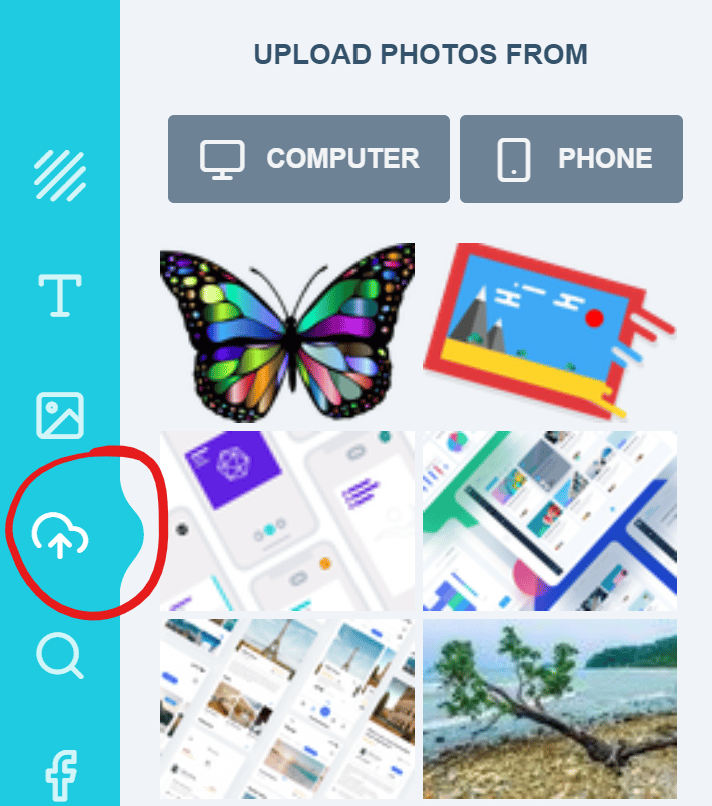
Navigate to the Upload Tab:
Upload Gallery
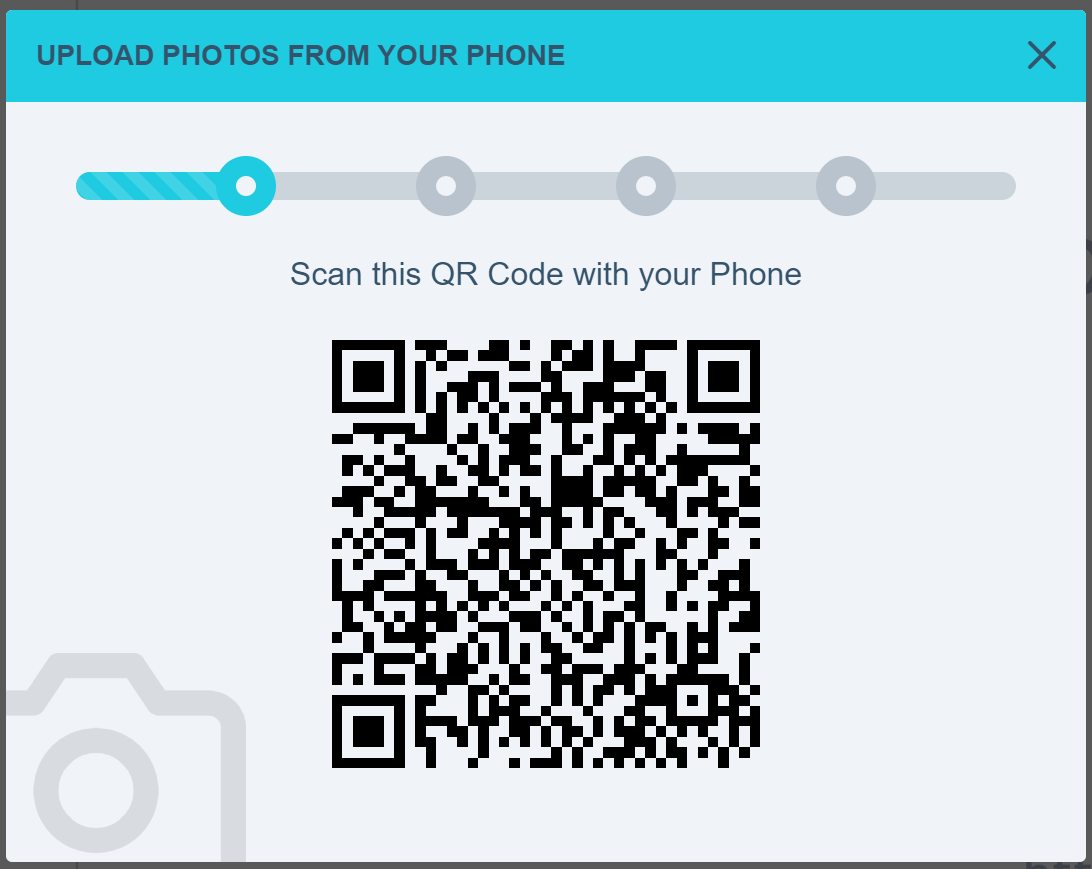
2. Clicking the PHONE Icon displays the QR Code Panel:
QR Code to start Upload
Scan the QR Code with your Phone and open the URL on your Phone.This shows a button that allows you to Add Photos for upload. Selecting your Photos automatically starts the upload, which progress is synced between both devices using a single, secure persistent socket connection.
Photo Upload Progress
Once the Upload completes and the images are processed, they are displayed in the Upload section of the PitchPrint app and are ready for use. Photos can be taken with Camera or from the Phone’s file system.We do have many more updates in the new version as well as the Admin panel and we’ll give a more detailed and comprehensive release note in the coming weeks.Thanks and do have a beautiful, bright year ahead.
{"docsConfig":{"theme":"mint","$schema":"https://mintlify.com/docs.json","name":"PitchPrint","colors":{"primary":"#6022E7","light":"#8B5CF6","dark":"#4C1BC4"},"logo":{"light":"https://mintcdn.com/pitchprint/lFqp-OsyXnf1Fc9b/brand/logo/light.svg?fit=max\u0026auto=format\u0026n=lFqp-OsyXnf1Fc9b\u0026q=85\u0026s=ec857289e0ade69316f8eff623821ad8","dark":"https://mintcdn.com/pitchprint/lFqp-OsyXnf1Fc9b/brand/logo/dark.svg?fit=max\u0026auto=format\u0026n=lFqp-OsyXnf1Fc9b\u0026q=85\u0026s=504b6c4556dad8a811dd61d2b802ecce"},"favicon":"https://mintcdn.com/pitchprint/lFqp-OsyXnf1Fc9b/brand/favicon.svg?fit=max\u0026auto=format\u0026n=lFqp-OsyXnf1Fc9b\u0026q=85\u0026s=b6f4f01ffcc134da4657f0b0d0a1b395","navbar":{"links":[{"href":"https://pitchprint.com","label":"Website"}],"primary":{"type":"button","label":"Dashboard","href":"https://admin.pitchprint.com/login"}},"footer":{"socials":{"x":"https://x.com/pitchprint","github":"https://github.com/pitchprint","linkedin":"https://linkedin.com/company/pitchprint"},"links":[{"header":"Product","items":[{"label":"PitchPrint","href":"https://pitchprint.com"},{"label":"Dashboard","href":"https://pitchprint.com/dashboard"}]},{"header":"Blog","items":[{"label":"Articles","href":"/blog/posts/ai-studio"},{"label":"Releases","href":"/blog/releases/2026"}]}]},"errors":{"404":{"redirect":false,"title":"Page not found","description":"This page may have moved when we rebuilt the docs. Try [search](/docs), the [installation guides](/docs/documentation/which-framework-should-i-pick), or the [API reference](/docs/api-reference/introduction). Still stuck? Email [support@pitchprint.com](mailto:support@pitchprint.com)."}},"contextual":{"options":["copy","view","chatgpt","claude","perplexity","mcp","cursor","vscode"],"display":"header"},"styling":{"latex":true},"navigation":{"global":{"anchors":[{"anchor":"Demos","icon":"circle-play","href":"https://wp.demo.pitchprint.io"},{"anchor":"Support","icon":"envelope","href":"mailto:support@pitchprint.com"}]},"pages":[]}},"deployment":{"deploymentMetadataValue":{"subdomain":"pitchprint","hasAudioNarration":false,"actualSubdomain":"pitchprint","customDomains":["pitchprint.com"],"gitSource":{"type":"github","owner":"pitchprint","repo":"docs","deployBranch":"main","contentDirectory":"","isPrivate":false,"mountPath":"","label":""},"chroma":{"collectionId":"8b3f5e9d-7001-4a57-9541-4a2322cc6249","liveDeploymentHistoryId":"6ad5d0509685d528bc7fa825","schemaVersion":"v3","latestBuiltDeploymentHistoryId":"6ad5d0509685d528bc7fa825"},"entitlements":{"AI_CHAT":{"status":"DISABLED"}},"buildId":"6ad5d0509685d528bc7fa825","clientVersion":"0.0.3971","searchFilterCounts":[{"language":"default","tag":"Documentation","count":154},{"language":"default","tag":"Tutorial","count":91},{"language":"default","tag":"Blog","count":39},{"language":"default","tag":"Tips 'n Tricks","count":32},{"language":"default","tag":"Admin Guide","count":27},{"language":"default","tag":"Using Modules","count":20},{"language":"default","tag":"API Reference","count":19},{"language":"default","tag":"Articles","count":14},{"language":"default","tag":"Installation Guide","count":12},{"language":"default","tag":"Sample Solutions","count":11}]},"assistantConfig":{"enableAskAiButton":false,"enableStarterQuestions":false,"enableContextualStarterQuestions":false,"enableAskAiSearchBar":true},"basePath":"","hasChatPermissions":false,"hasWebMcpPermissions":false,"toggles":[{"name":"kill-isr","enabled":true,"variant":{"name":"disabled","enabled":false,"feature_enabled":true},"impressionData":false},{"name":"agent-mintlify-slack","enabled":true,"variant":{"name":"disabled","enabled":false,"feature_enabled":true},"impressionData":false},{"name":"editor-v7-file-tree","enabled":true,"variant":{"name":"disabled","enabled":false,"feature_enabled":true},"impressionData":false},{"name":"agent-integrations-settings","enabled":true,"variant":{"name":"disabled","enabled":false,"feature_enabled":true},"impressionData":false},{"name":"automations-pr-grouping","enabled":true,"variant":{"name":"disabled","enabled":false,"feature_enabled":true},"impressionData":false},{"name":"custom-prefix","enabled":true,"variant":{"name":"disabled","enabled":false,"feature_enabled":true},"impressionData":false},{"name":"analytics-v7","enabled":true,"variant":{"name":"disabled","enabled":false,"feature_enabled":true},"impressionData":false},{"name":"user-flows-analytics","enabled":true,"variant":{"name":"disabled","enabled":false,"feature_enabled":true},"impressionData":false},{"name":"no-publish-flow","enabled":true,"variant":{"name":"disabled","enabled":false,"feature_enabled":true},"impressionData":false},{"name":"workos-onboarding","enabled":true,"variant":{"name":"disabled","enabled":false,"feature_enabled":true},"impressionData":false},{"name":"llms-txt-v2","enabled":true,"variant":{"name":"disabled","enabled":false,"feature_enabled":true},"impressionData":false},{"name":"pause-universal-search-reconcile","enabled":true,"variant":{"name":"disabled","enabled":false,"feature_enabled":true},"impressionData":false},{"name":"snapshot-serving-live","enabled":true,"variant":{"name":"disabled","enabled":false,"feature_enabled":true},"impressionData":false},{"name":"stripTemperatureMiddleware","enabled":true,"variant":{"name":"disabled","enabled":false,"feature_enabled":true},"impressionData":false},{"name":"per-site-search-delta","enabled":true,"variant":{"name":"disabled","enabled":false,"feature_enabled":true},"impressionData":false},{"name":"support-platform-pylon-zendesk","enabled":true,"variant":{"name":"disabled","enabled":false,"feature_enabled":true},"impressionData":false},{"name":"snapshot-serving","enabled":true,"variant":{"name":"disabled","enabled":false,"feature_enabled":true},"impressionData":false},{"name":"instant-rollback","enabled":true,"variant":{"name":"disabled","enabled":false,"feature_enabled":true},"impressionData":false},{"name":"granular-notifications-server","enabled":true,"variant":{"name":"disabled","enabled":false,"feature_enabled":true},"impressionData":false},{"name":"granular-notifications","enabled":true,"variant":{"name":"disabled","enabled":false,"feature_enabled":true},"impressionData":false},{"name":"editor-private-page-search","enabled":true,"variant":{"name":"disabled","enabled":false,"feature_enabled":true},"impressionData":false},{"name":"automations-fable","enabled":true,"variant":{"name":"disabled","enabled":false,"feature_enabled":true},"impressionData":false},{"name":"fixed-ai-action-pricing","enabled":true,"variant":{"name":"disabled","enabled":false,"feature_enabled":true},"impressionData":false},{"name":"automation-resolve-merge-conflict","enabled":true,"variant":{"name":"disabled","enabled":false,"feature_enabled":true},"impressionData":false},{"name":"scoped-publishing","enabled":true,"variant":{"name":"disabled","enabled":false,"feature_enabled":true},"impressionData":false},{"name":"mintql","enabled":true,"variant":{"name":"disabled","enabled":false,"feature_enabled":true},"impressionData":false},{"name":"page-level-analytics","enabled":true,"variant":{"name":"disabled","enabled":false,"feature_enabled":true},"impressionData":false},{"name":"editor-version-history-v2","enabled":true,"variant":{"name":"disabled","enabled":false,"feature_enabled":true},"impressionData":false},{"name":"editor-nav-generations","enabled":true,"variant":{"name":"disabled","enabled":false,"feature_enabled":true},"impressionData":false},{"name":"billing-page-v2","enabled":true,"variant":{"name":"disabled","enabled":false,"feature_enabled":true},"impressionData":false},{"name":"workspace-projects","enabled":true,"variant":{"name":"disabled","enabled":false,"feature_enabled":true},"impressionData":false},{"name":"assistant-v5","enabled":true,"variant":{"name":"disabled","enabled":false,"feature_enabled":true},"impressionData":false},{"name":"byok-sep-25","enabled":true,"variant":{"name":"disabled","enabled":false,"feature_enabled":true},"impressionData":false},{"name":"fork-pr-previews","enabled":true,"variant":{"name":"disabled","enabled":false,"feature_enabled":true},"impressionData":false},{"name":"revalidation-jwt","enabled":true,"variant":{"name":"disabled","enabled":false,"feature_enabled":true},"impressionData":false},{"name":"vite-origin","enabled":true,"variant":{"name":"disabled","enabled":false,"feature_enabled":true},"impressionData":false},{"name":"editor-agent-model-picker","enabled":true,"variant":{"name":"disabled","enabled":false,"feature_enabled":true},"impressionData":false},{"name":"billing-updated-9-15","enabled":true,"variant":{"name":"disabled","enabled":false,"feature_enabled":true},"impressionData":false},{"name":"workos-sso-scim","enabled":true,"variant":{"name":"disabled","enabled":false,"feature_enabled":true},"impressionData":false},{"name":"hobby-abuse-scan","enabled":true,"variant":{"name":"disabled","enabled":false,"feature_enabled":true},"impressionData":false},{"name":"dashboard-inbox","enabled":true,"variant":{"name":"disabled","enabled":false,"feature_enabled":true},"impressionData":false},{"name":"workos-signup","enabled":true,"variant":{"name":"disabled","enabled":false,"feature_enabled":true},"impressionData":false},{"name":"workos-enabled","enabled":true,"variant":{"name":"disabled","enabled":false,"feature_enabled":true},"impressionData":false}],"isAtlas":false,"googleFontsInlined":false},"customCss":[{"filePath":"style.css","content":"header button[aria-haspopup=menu],nav button[aria-haspopup=menu]{display:none!important}"}],"page":{"pagePath":"blog/posts/upload-photos-from-phone","slug":"/blog/posts/upload-photos-from-phone","pageMetadata":{"title":"Upload Photos from Phone","description":"A simple feature that allows users upload photos from their phone unto PitchPrint app for use in their designs using QR Code.","tag":"Featured","author":"Isaac Coker","date":"2020-01-27","keywords":["qr code","photo upload","mobile upload","kiosk","photo prints"],"og:image":"/images/2020/01/matyas-prochy-Jf-ezcuKAaA-unsplash.jpg","twitter:image":"/images/2020/01/matyas-prochy-Jf-ezcuKAaA-unsplash.jpg","cover":"/images/2020/01/matyas-prochy-Jf-ezcuKAaA-unsplash.jpg","summary":"Customers send photos from their phone with a QR code.","href":"/blog/posts/upload-photos-from-phone"},"description":{"compiledSource":"\"use strict\";\nconst {jsx: _jsx} = arguments[0];\nconst {useMDXComponents: _provideComponents} = arguments[0];\nfunction _createMdxContent(props) {\n const _components = {\n p: \"p\",\n ..._provideComponents(),\n ...props.components\n };\n return _jsx(_components.p, {\n children: \"A simple feature that allows users upload photos from their phone unto PitchPrint app for use in their designs using QR Code.\"\n });\n}\nfunction MDXContent(props = {}) {\n const {wrapper: MDXLayout} = {\n ..._provideComponents(),\n ...props.components\n };\n return MDXLayout ? _jsx(MDXLayout, {\n ...props,\n children: _jsx(_createMdxContent, {\n ...props\n })\n }) : _createMdxContent(props);\n}\nreturn {\n default: MDXContent\n};\n","frontmatter":{},"scope":{}},"pageType":"default","mdx":{"mdxSource":{"compiledSource":"\"use strict\";const{Fragment:_Fragment,jsx:_jsx,jsxs:_jsxs}=arguments[0];const{useMDXComponents:_provideComponents}=arguments[0];const props_0=undefined;function _createMdxContent(props){const _components={a:`a`,li:`li`,ol:`ol`,p:`p`,strong:`strong`,..._provideComponents(),...props.components},{Frame,OptimizedImage}=_components;if(!Frame)_missingMdxReference(`Frame`,true);if(!OptimizedImage)_missingMdxReference(`OptimizedImage`,true);return _jsxs(_Fragment,{children:[_jsxs(`div`,{style:{display:`flex`,alignItems:`center`,gap:`0.5rem`,fontSize:`0.875rem`,opacity:.7,marginBottom:`1.5rem`},children:[_jsx(`span`,{}),_jsx(`span`,{children:`·`}),_jsx(`span`,{children:props_0.date}),props_0.readTime\u0026\u0026_jsxs(_Fragment,{children:[_jsx(`span`,{children:`·`}),_jsx(`span`,{children:props_0.readTime})]})]}),`\n`,_jsx(Frame,{children:_jsx(OptimizedImage,{src:`https://mintcdn.com/pitchprint/PZh1rbLpfxNLQmDb/blog/images/2020/01/matyas-prochy-Jf-ezcuKAaA-unsplash.jpg?fit=max\u0026auto=format\u0026n=PZh1rbLpfxNLQmDb\u0026q=85\u0026s=4821e5f7a94bd4c691a2cac52438899e`,alt:`Cover photo for the upload photos from phone announcement`,\"data-og-width\":`2000`,width:`2000`,\"data-og-height\":`1333`,height:`1333`,\"data-path\":`blog/images/2020/01/matyas-prochy-Jf-ezcuKAaA-unsplash.jpg`,\"data-optimize\":`true`,\"data-opv\":`3`,srcset:`https://mintcdn.com/pitchprint/PZh1rbLpfxNLQmDb/blog/images/2020/01/matyas-prochy-Jf-ezcuKAaA-unsplash.jpg?w=280\u0026fit=max\u0026auto=format\u0026n=PZh1rbLpfxNLQmDb\u0026q=85\u0026s=e099a0bf0b9702e368b7908ca33d2f0f 280w, https://mintcdn.com/pitchprint/PZh1rbLpfxNLQmDb/blog/images/2020/01/matyas-prochy-Jf-ezcuKAaA-unsplash.jpg?w=560\u0026fit=max\u0026auto=format\u0026n=PZh1rbLpfxNLQmDb\u0026q=85\u0026s=591a80b022935b46216cdb113911e18f 560w, https://mintcdn.com/pitchprint/PZh1rbLpfxNLQmDb/blog/images/2020/01/matyas-prochy-Jf-ezcuKAaA-unsplash.jpg?w=840\u0026fit=max\u0026auto=format\u0026n=PZh1rbLpfxNLQmDb\u0026q=85\u0026s=26d5fe1f285008ebde231c11875d61ff 840w, https://mintcdn.com/pitchprint/PZh1rbLpfxNLQmDb/blog/images/2020/01/matyas-prochy-Jf-ezcuKAaA-unsplash.jpg?w=1100\u0026fit=max\u0026auto=format\u0026n=PZh1rbLpfxNLQmDb\u0026q=85\u0026s=845055bd2afaa45e045a1b008be1c746 1100w, https://mintcdn.com/pitchprint/PZh1rbLpfxNLQmDb/blog/images/2020/01/matyas-prochy-Jf-ezcuKAaA-unsplash.jpg?w=1650\u0026fit=max\u0026auto=format\u0026n=PZh1rbLpfxNLQmDb\u0026q=85\u0026s=8d07959273663c08f7c8375642bef30e 1650w, https://mintcdn.com/pitchprint/PZh1rbLpfxNLQmDb/blog/images/2020/01/matyas-prochy-Jf-ezcuKAaA-unsplash.jpg?w=2500\u0026fit=max\u0026auto=format\u0026n=PZh1rbLpfxNLQmDb\u0026q=85\u0026s=c7fa037db9ad0f8f7882db7b169b4065 2500w`})}),`\n`,_jsx(_components.p,{children:`Hi everyone 👋`}),`\n`,_jsx(_components.p,{children:`A few weeks back, we received a request from a client that needed to use PitchPrint on their Kiosk that allows visitors to quickly order photo prints from their public-facing machine. The Kiosk stand obviously runs our app but has a limitation; It being in the public space means users have to find a way to get their photos unto the machine. They didn’t want to use USB connectors as that can propagate viruses and other device malware.`}),`\n`,_jsx(_components.p,{children:`So they filed in a request with us for a QR Code feature that will allow users scan a QR Code on the app and from there upload their Photos. So we thought about it being useful even beyond kiosk machines.`}),`\n`,_jsx(_components.p,{children:`While the PC strikes a chunk of online commerce, most of us today, have more Photos on our mobile devices than on our computers and it’s always a pain transferring files between devices.`}),`\n`,_jsx(_components.p,{children:`This feature aims to remove that pain-point by displaying a QR Code that users can scan with their mobile devices, which loads a page that allows them to upload Photos straight into their PitchPrint project without the hassles of cable connection or cloud file transfer between file service providers. It’s that simple and seamless. SCAN, UPLOAD \u0026 USE 👌`}),`\n`,_jsxs(_components.p,{children:[`You can test it here in our demo page: `,_jsx(_components.a,{href:`https://wp.demo.pitchprint.io/product/photo-prints/`,children:`https://wp.demo.pitchprint.io/product/photo-prints/`})]}),`\n`,_jsxs(_components.ol,{children:[`\n`,_jsx(_components.li,{children:`Navigate to the Upload Tab:`}),`\n`]}),`\n`,_jsx(Frame,{caption:`Upload Gallery`,children:_jsx(OptimizedImage,{src:`https://mintcdn.com/pitchprint/PZh1rbLpfxNLQmDb/blog/images/2020/01/image.png?fit=max\u0026auto=format\u0026n=PZh1rbLpfxNLQmDb\u0026q=85\u0026s=bfc13143a4e94a969ce4d60da04b323c`,alt:`The Upload tab of the app's photo gallery panel`,\"data-og-width\":`712`,width:`712`,\"data-og-height\":`806`,height:`806`,\"data-path\":`blog/images/2020/01/image.png`,\"data-optimize\":`true`,\"data-opv\":`3`,srcset:`https://mintcdn.com/pitchprint/PZh1rbLpfxNLQmDb/blog/images/2020/01/image.png?w=280\u0026fit=max\u0026auto=format\u0026n=PZh1rbLpfxNLQmDb\u0026q=85\u0026s=f7c6963d603ce9f8649dedbc26e97bbb 280w, https://mintcdn.com/pitchprint/PZh1rbLpfxNLQmDb/blog/images/2020/01/image.png?w=560\u0026fit=max\u0026auto=format\u0026n=PZh1rbLpfxNLQmDb\u0026q=85\u0026s=649500a23c0be2eaa619bfc4e2f92723 560w, https://mintcdn.com/pitchprint/PZh1rbLpfxNLQmDb/blog/images/2020/01/image.png?w=840\u0026fit=max\u0026auto=format\u0026n=PZh1rbLpfxNLQmDb\u0026q=85\u0026s=968054961ebc8324afaaf957b06d5c62 840w, https://mintcdn.com/pitchprint/PZh1rbLpfxNLQmDb/blog/images/2020/01/image.png?w=1100\u0026fit=max\u0026auto=format\u0026n=PZh1rbLpfxNLQmDb\u0026q=85\u0026s=0d77e65a385ba00b61bbce1ddeaf83c3 1100w, https://mintcdn.com/pitchprint/PZh1rbLpfxNLQmDb/blog/images/2020/01/image.png?w=1650\u0026fit=max\u0026auto=format\u0026n=PZh1rbLpfxNLQmDb\u0026q=85\u0026s=ad9aaa6ed7ae2216670941f876673d95 1650w, https://mintcdn.com/pitchprint/PZh1rbLpfxNLQmDb/blog/images/2020/01/image.png?w=2500\u0026fit=max\u0026auto=format\u0026n=PZh1rbLpfxNLQmDb\u0026q=85\u0026s=632f64c81226cc56adca93d1e1d76722 2500w`})}),`\n`,_jsxs(_components.p,{children:[`2. Clicking the `,_jsx(_components.strong,{children:`PHONE`}),` Icon displays the QR Code Panel:`]}),`\n`,_jsx(Frame,{caption:`QR Code to start Upload`,children:_jsx(OptimizedImage,{src:`https://mintcdn.com/pitchprint/PZh1rbLpfxNLQmDb/blog/images/2020/01/image-1.png?fit=max\u0026auto=format\u0026n=PZh1rbLpfxNLQmDb\u0026q=85\u0026s=9eb991565deff381be85e720cc574623`,alt:`The QR code panel shown after clicking the phone icon`,\"data-og-width\":`1092`,width:`1092`,\"data-og-height\":`869`,height:`869`,\"data-path\":`blog/images/2020/01/image-1.png`,\"data-optimize\":`true`,\"data-opv\":`3`,srcset:`https://mintcdn.com/pitchprint/PZh1rbLpfxNLQmDb/blog/images/2020/01/image-1.png?w=280\u0026fit=max\u0026auto=format\u0026n=PZh1rbLpfxNLQmDb\u0026q=85\u0026s=cd6849616320b54c7ee8d5adc6659394 280w, https://mintcdn.com/pitchprint/PZh1rbLpfxNLQmDb/blog/images/2020/01/image-1.png?w=560\u0026fit=max\u0026auto=format\u0026n=PZh1rbLpfxNLQmDb\u0026q=85\u0026s=fb9646e86bfb1f80ffcd42a107d1b4a5 560w, https://mintcdn.com/pitchprint/PZh1rbLpfxNLQmDb/blog/images/2020/01/image-1.png?w=840\u0026fit=max\u0026auto=format\u0026n=PZh1rbLpfxNLQmDb\u0026q=85\u0026s=304829f3eba0fa1f9861fa9c51c6d489 840w, https://mintcdn.com/pitchprint/PZh1rbLpfxNLQmDb/blog/images/2020/01/image-1.png?w=1100\u0026fit=max\u0026auto=format\u0026n=PZh1rbLpfxNLQmDb\u0026q=85\u0026s=e76cee2537887aa712c30b0ecccc167f 1100w, https://mintcdn.com/pitchprint/PZh1rbLpfxNLQmDb/blog/images/2020/01/image-1.png?w=1650\u0026fit=max\u0026auto=format\u0026n=PZh1rbLpfxNLQmDb\u0026q=85\u0026s=342ad9eabf4f9c95bbe086c0560d5490 1650w, https://mintcdn.com/pitchprint/PZh1rbLpfxNLQmDb/blog/images/2020/01/image-1.png?w=2500\u0026fit=max\u0026auto=format\u0026n=PZh1rbLpfxNLQmDb\u0026q=85\u0026s=a73e37c02a7c2c99f19eb7375282204c 2500w`})}),`\n`,_jsx(_components.p,{children:`Scan the QR Code with your Phone and open the URL on your Phone.`}),`\n`,_jsx(_components.p,{children:`This shows a button that allows you to Add Photos for upload. Selecting your Photos automatically starts the upload, which progress is synced between both devices using a single, secure persistent socket connection.`}),`\n`,_jsx(Frame,{caption:`Photo Upload Progress`,children:_jsx(OptimizedImage,{src:`https://mintcdn.com/pitchprint/PZh1rbLpfxNLQmDb/blog/images/2020/01/image-2.png?fit=max\u0026auto=format\u0026n=PZh1rbLpfxNLQmDb\u0026q=85\u0026s=08246be24de5c22ccb39e6171b7858a5`,alt:`Upload progress for photos being sent from a phone into the project`,\"data-og-width\":`930`,width:`930`,\"data-og-height\":`1222`,height:`1222`,\"data-path\":`blog/images/2020/01/image-2.png`,\"data-optimize\":`true`,\"data-opv\":`3`,srcset:`https://mintcdn.com/pitchprint/PZh1rbLpfxNLQmDb/blog/images/2020/01/image-2.png?w=280\u0026fit=max\u0026auto=format\u0026n=PZh1rbLpfxNLQmDb\u0026q=85\u0026s=4fb673d1818ccc298060d15ad3664415 280w, https://mintcdn.com/pitchprint/PZh1rbLpfxNLQmDb/blog/images/2020/01/image-2.png?w=560\u0026fit=max\u0026auto=format\u0026n=PZh1rbLpfxNLQmDb\u0026q=85\u0026s=e62a1637c209185589064c9480074e2d 560w, https://mintcdn.com/pitchprint/PZh1rbLpfxNLQmDb/blog/images/2020/01/image-2.png?w=840\u0026fit=max\u0026auto=format\u0026n=PZh1rbLpfxNLQmDb\u0026q=85\u0026s=99f818887be4efa0d59247d1ca44f119 840w, https://mintcdn.com/pitchprint/PZh1rbLpfxNLQmDb/blog/images/2020/01/image-2.png?w=1100\u0026fit=max\u0026auto=format\u0026n=PZh1rbLpfxNLQmDb\u0026q=85\u0026s=1975c5014ee05c45fcd53f512beb476b 1100w, https://mintcdn.com/pitchprint/PZh1rbLpfxNLQmDb/blog/images/2020/01/image-2.png?w=1650\u0026fit=max\u0026auto=format\u0026n=PZh1rbLpfxNLQmDb\u0026q=85\u0026s=1865150dee358ae6c96abc5b70f939ff 1650w, https://mintcdn.com/pitchprint/PZh1rbLpfxNLQmDb/blog/images/2020/01/image-2.png?w=2500\u0026fit=max\u0026auto=format\u0026n=PZh1rbLpfxNLQmDb\u0026q=85\u0026s=b07b8a163ec864ae5c2f5bcf8e57a0bc 2500w`})}),`\n`,_jsx(_components.p,{children:`Once the Upload completes and the images are processed, they are displayed in the Upload section of the PitchPrint app and are ready for use. Photos can be taken with Camera or from the Phone’s file system.`}),`\n`,_jsx(_components.p,{children:`We do have many more updates in the new version as well as the Admin panel and we’ll give a more detailed and comprehensive release note in the coming weeks.`}),`\n`,_jsx(_components.p,{children:`Thanks and do have a beautiful, bright year ahead.`})]})}function MDXContent(props={}){const{wrapper:MDXLayout}={..._provideComponents(),...props.components};return MDXLayout?_jsx(MDXLayout,{...props,children:_jsx(_createMdxContent,{...props})}):_createMdxContent(props)}return{props_0,default:MDXContent};function _missingMdxReference(id,component){throw new Error(`Expected `+(component?`component`:`object`)+\" `\"+id+\"` to be defined: you likely forgot to import, pass, or provide it.\")}","frontmatter":{},"scope":{"config":{},"pageMetadata":{"title":"Upload Photos from Phone","description":"A simple feature that allows users upload photos from their phone unto PitchPrint app for use in their designs using QR Code.","tag":"Featured","author":"Isaac Coker","date":"2020-01-27","keywords":["qr code","photo upload","mobile upload","kiosk","photo prints"],"og:image":"/images/2020/01/matyas-prochy-Jf-ezcuKAaA-unsplash.jpg","twitter:image":"/images/2020/01/matyas-prochy-Jf-ezcuKAaA-unsplash.jpg","cover":"/images/2020/01/matyas-prochy-Jf-ezcuKAaA-unsplash.jpg","summary":"Customers send photos from their phone with a QR code.","href":"/blog/posts/upload-photos-from-phone"}}},"mdxSourceWithNoJs":null,"noJsSplices":[[475,476,""],[602,814,"_jsx(`span`,{children:`·`})}),`\n`,_jsx(F"]]},"mdxExtracts":{"tableOfContents":[],"codeExamples":{}},"jsLinks":["/_mintlify/custom/pitchprint/886e30c9af4224f6/scripts/convert-to-markdown.js","/_mintlify/custom/pitchprint/c953c1c1f34b6af4/scripts/example.js","/_mintlify/custom/pitchprint/14cc91d930d58432/scripts/helpscout.js","/_mintlify/custom/pitchprint/8f78fad523c4930d/scripts/publish-to-docs.js","/_mintlify/custom/pitchprint/8be7daf1bdca8db0/scripts/generate-blog-summaries.js","/_mintlify/custom/pitchprint/fc72494a10805019/scripts/ingest-new.js","/_mintlify/custom/pitchprint/dec987e667653622/scripts/report-drift.js","/_mintlify/custom/pitchprint/e456009a2e9f0ad5/scripts/registry.js","/_mintlify/custom/pitchprint/13fc4b20d6eac8f8/scripts/fetch-blog-releases.js"],"subdomain":"pitchprint","siteName":"PitchPrint","title":"Upload Photos from Phone - PitchPrint","navMaps":{"firstHrefInVersion":{},"firstHrefInLanguage":{}},"lastModified":"2026-10-13T10:00:24.491Z","originalFileLocation":"blog/posts/upload-photos-from-phone.mdx"},"headHtml":"\u003cscript data-mint-head>(function(){var d=document.documentElement,p=null;if(!p){try{p=localStorage.getItem(\"isDarkMode\")}catch(e){}if(p==='true')p='dark';else if(p==='false')p='light';if(p!=='light'\u0026\u0026p!=='dark'\u0026\u0026p!=='system')p=\"system\"}var r=p==='system'?(matchMedia(\"(prefers-color-scheme: dark)\").matches?'dark':'light'):p;d.classList.remove(r==='dark'?'light':'dark');d.classList.add(r);d.setAttribute(\"data-theme-preference\",p)})();\u003c/script>\u003cmeta data-mint-head name=\"description\" content=\"A simple feature that allows users upload photos from their phone unto PitchPrint app for use in their designs using QR Code.\">\u003cmeta data-mint-head name=\"application-name\" content=\"PitchPrint\">\u003cmeta data-mint-head name=\"generator\" content=\"Mintlify\">\u003clink data-mint-head rel=\"icon\" type=\"image/png\" sizes=\"192x192\" href=\"/mintlify-assets/_mintlify/favicons/pitchprint/6gqAs1_dwfh54HA4/_generated/favicon/android-chrome-192x192.png\" media=\"(prefers-color-scheme: light)\">\u003clink data-mint-head rel=\"apple-touch-icon\" type=\"image/png\" sizes=\"180x180\" href=\"/mintlify-assets/_mintlify/favicons/pitchprint/6gqAs1_dwfh54HA4/_generated/favicon/apple-touch-icon.png\">\u003clink data-mint-head rel=\"icon\" type=\"image/png\" sizes=\"16x16\" href=\"/mintlify-assets/_mintlify/favicons/pitchprint/6gqAs1_dwfh54HA4/_generated/favicon/favicon-16x16.png\" media=\"(prefers-color-scheme: light)\">\u003clink data-mint-head rel=\"icon\" type=\"image/png\" sizes=\"32x32\" href=\"/mintlify-assets/_mintlify/favicons/pitchprint/6gqAs1_dwfh54HA4/_generated/favicon/favicon-32x32.png\" media=\"(prefers-color-scheme: light)\">\u003clink data-mint-head rel=\"shortcut icon\" type=\"image/x-icon\" href=\"/mintlify-assets/_mintlify/favicons/pitchprint/6gqAs1_dwfh54HA4/_generated/favicon/favicon.ico\" media=\"(prefers-color-scheme: light)\">\u003clink data-mint-head rel=\"icon\" type=\"image/png\" sizes=\"192x192\" href=\"/mintlify-assets/_mintlify/favicons/pitchprint/6gqAs1_dwfh54HA4/_generated/favicon-dark/android-chrome-192x192.png\" media=\"(prefers-color-scheme: dark)\">\u003clink data-mint-head rel=\"icon\" type=\"image/png\" sizes=\"16x16\" href=\"/mintlify-assets/_mintlify/favicons/pitchprint/6gqAs1_dwfh54HA4/_generated/favicon-dark/favicon-16x16.png\" media=\"(prefers-color-scheme: dark)\">\u003clink data-mint-head rel=\"icon\" type=\"image/png\" sizes=\"32x32\" href=\"/mintlify-assets/_mintlify/favicons/pitchprint/6gqAs1_dwfh54HA4/_generated/favicon-dark/favicon-32x32.png\" media=\"(prefers-color-scheme: dark)\">\u003clink data-mint-head rel=\"shortcut icon\" type=\"image/x-icon\" href=\"/mintlify-assets/_mintlify/favicons/pitchprint/6gqAs1_dwfh54HA4/_generated/favicon-dark/favicon.ico\" media=\"(prefers-color-scheme: dark)\">\u003cmeta data-mint-head property=\"og:title\" content=\"Upload Photos from Phone - PitchPrint\">\u003cmeta data-mint-head property=\"og:description\" content=\"A simple feature that allows users upload photos from their phone unto PitchPrint app for use in their designs using QR Code.\">\u003cmeta data-mint-head property=\"og:site_name\" content=\"PitchPrint\">\u003cmeta data-mint-head property=\"og:url\" content=\"https://pitchprint.com/blog/posts/upload-photos-from-phone\">\u003cmeta data-mint-head property=\"og:type\" content=\"website\">\u003cmeta data-mint-head property=\"og:image\" content=\"https://pitchprint.mintlify.app/images/2020/01/matyas-prochy-Jf-ezcuKAaA-unsplash.jpg\">\u003cmeta data-mint-head property=\"og:image:width\" content=\"1200\">\u003cmeta data-mint-head property=\"og:image:height\" content=\"630\">\u003cmeta data-mint-head name=\"twitter:card\" content=\"summary_large_image\">\u003cmeta data-mint-head name=\"twitter:title\" content=\"Upload Photos from Phone - PitchPrint\">\u003cmeta data-mint-head name=\"twitter:description\" content=\"A simple feature that allows users upload photos from their phone unto PitchPrint app for use in their designs using QR Code.\">\u003cmeta data-mint-head name=\"twitter:image\" content=\"https://pitchprint.mintlify.app/images/2020/01/matyas-prochy-Jf-ezcuKAaA-unsplash.jpg\">\u003cmeta data-mint-head name=\"twitter:image:width\" content=\"1200\">\u003cmeta data-mint-head name=\"twitter:image:height\" content=\"630\">\u003cmeta data-mint-head name=\"msapplication-config\" content=\"/mintlify-assets/_mintlify/favicons/pitchprint/6gqAs1_dwfh54HA4/_generated/favicon/browserconfig.xml\">\u003cmeta data-mint-head name=\"apple-mobile-web-app-title\" content=\"PitchPrint\">\u003cmeta data-mint-head name=\"msapplication-TileColor\" content=\"#6022E7\">\u003clink data-mint-head rel=\"canonical\" href=\"https://pitchprint.com/blog/posts/upload-photos-from-phone\">\u003clink data-mint-head rel=\"alternate\" type=\"application/xml\" href=\"/sitemap.xml\">\u003clink data-mint-head rel=\"alternate\" type=\"text/markdown\" href=\"/blog/posts/upload-photos-from-phone.md\">\u003cscript data-mint-head type=\"application/ld+json\">{\"@context\":\"https://schema.org\",\"@graph\":[{\"@type\":\"Organization\",\"@id\":\"https://pitchprint.com/#organization\",\"name\":\"PitchPrint\",\"url\":\"https://pitchprint.com\",\"logo\":{\"@type\":\"ImageObject\",\"url\":\"https://mintcdn.com/pitchprint/lFqp-OsyXnf1Fc9b/brand/logo/light.svg?fit=max\u0026auto=format\u0026n=lFqp-OsyXnf1Fc9b\u0026q=85\u0026s=ec857289e0ade69316f8eff623821ad8\"}},{\"@type\":\"WebSite\",\"@id\":\"https://pitchprint.com#website\",\"name\":\"PitchPrint\",\"url\":\"https://pitchprint.com\",\"publisher\":{\"@id\":\"https://pitchprint.com/#organization\"}},{\"@type\":\"WebPage\",\"@id\":\"https://pitchprint.com/blog/posts/upload-photos-from-phone#webpage\",\"url\":\"https://pitchprint.com/blog/posts/upload-photos-from-phone\",\"name\":\"Upload Photos from Phone\",\"description\":\"A simple feature that allows users upload photos from their phone unto PitchPrint app for use in their designs using QR Code.\",\"dateModified\":\"2026-10-13T10:00:24.491Z\",\"isPartOf\":{\"@id\":\"https://pitchprint.com#website\"},\"breadcrumb\":{\"@id\":\"https://pitchprint.com/blog/posts/upload-photos-from-phone#breadcrumb\"}},{\"@type\":\"BreadcrumbList\",\"@id\":\"https://pitchprint.com/blog/posts/upload-photos-from-phone#breadcrumb\",\"itemListElement\":[{\"@type\":\"ListItem\",\"position\":1,\"name\":\"Articles\",\"item\":\"https://pitchprint.com/blog/posts/ai-studio\"},{\"@type\":\"ListItem\",\"position\":2,\"name\":\"Upload Photos from Phone\",\"item\":\"https://pitchprint.com/blog/posts/upload-photos-from-phone\"}]},{\"@type\":[\"Article\",\"TechArticle\"],\"@id\":\"https://pitchprint.com/blog/posts/upload-photos-from-phone#article\",\"headline\":\"Upload Photos from Phone\",\"name\":\"Upload Photos from Phone\",\"description\":\"A simple feature that allows users upload photos from their phone unto PitchPrint app for use in their designs using QR Code.\",\"url\":\"https://pitchprint.com/blog/posts/upload-photos-from-phone\",\"mainEntityOfPage\":{\"@id\":\"https://pitchprint.com/blog/posts/upload-photos-from-phone#webpage\"},\"image\":\"https://pitchprint.com/images/2020/01/matyas-prochy-Jf-ezcuKAaA-unsplash.jpg\",\"dateModified\":\"2026-10-13T10:00:24.491Z\",\"keywords\":\"qr code, photo upload, mobile upload, kiosk, photo prints\",\"publisher\":{\"@id\":\"https://pitchprint.com/#organization\"},\"isPartOf\":{\"@id\":\"https://pitchprint.com#website\"}}]}\u003c/script>\u003cscript data-mint-head type=\"application/ld+json\">{\"@context\":\"https://schema.org\",\"@type\":\"WebSite\",\"name\":\"PitchPrint\",\"creator\":{\"@type\":\"Organization\",\"name\":\"Mintlify\",\"url\":\"https://mintlify.com\"}}\u003c/script>","siteName":"PitchPrint","nav":{"global":{"anchors":[{"anchor":"Demos","icon":"circle-play","href":"https://wp.demo.pitchprint.io"},{"anchor":"Support","icon":"envelope","href":"mailto:support@pitchprint.com"}]},"products":[{"product":"Documentation","icon":"book","pages":[{"title":"Documentation","href":"/docs"}]},{"product":"Blog","icon":"newspaper","tabs":[{"tab":"Blog","icon":"newspaper","groups":[{"group":"Latest","pages":[{"title":"PitchPrint Blog","mode":"wide","href":"/blog"}]},{"group":"Articles","icon":"star","expanded":true,"pages":[{"title":"Introducing the New AI Studio for Admins","sidebarTitle":"AI Studio for Admins","tag":"Featured","href":"/blog/posts/ai-studio"},{"title":"PitchPrint Wordpress Integration","tag":"Featured","href":"/blog/posts/wordpress-integration"},{"title":"PDF Rendering","tag":"Engineering","href":"/blog/posts/distilling-pdf"},{"title":"Smart Sizes","tag":"Featured","href":"/blog/posts/smart-sizes"},{"title":"Spark - Print API","tag":"Spark","href":"/blog/posts/spark"},{"title":"Introducing our new Admin Portal","tag":"Featured","href":"/blog/posts/new-admin-portal"},{"title":"Under the Hood: PDF rendering","tag":"Engineering","href":"/blog/posts/under-the-hood-pdf-rendering"},{"title":"Under the Hood: Photo Upload Pipeline","sidebarTitle":"Photo Upload Pipeline","tag":"Engineering","href":"/blog/posts/under-the-hood-photo-upload-pipeline"},{"title":"PitchPrint + BigCommerce","tag":"BigCommerce","href":"/blog/posts/pitchprint-bigcommerce"},{"title":"Photo Print Module Update 🖼","tag":"Modules","href":"/blog/posts/photo-print-module"},{"title":"PitchPrint + 3dcart","description":"PitchPrint is now available on 3dcart and can be installed right from the App Store","tag":"3dcart","href":"/blog/posts/pitchprint-on-3dcart"},{"title":"Upload Photos from Phone","tag":"Featured","href":"/blog/posts/upload-photos-from-phone"},{"title":"Version 10 Release","description":"We know this took us way longer than planned, our apologies.","tag":"Featured","href":"/blog/posts/version-10-release"},{"title":"PitchPrint @ Prindustry Connect Event 2019","sidebarTitle":"PitchPrint @ Prindustry Connect Event 2019","tag":"Event","href":"/blog/posts/pitchprint-at-prindustry-connect-2019"}]}]},{"tab":"Releases","icon":"rocket","pages":[{"title":"Releases","href":"/blog/releases/2026"}]}]}]},"title":"Upload Photos from Phone - PitchPrint","buildId":"dpl_DFJrtvUi8HS5F9nkooKuDJsuD5BM","deploymentId":"dpl_DFJrtvUi8HS5F9nkooKuDJsuD5BM","dynamics":["07c022d89b","a74be98ba7"],"chunks":["Frame-COGkNuA6.js","DynamicMarkdown-85clUA0i.js","zoom-image-lightbox-BZxD9MAj.js","lightbox-handle-r17bVUz3.js"]}