> ## Documentation Index
> Fetch the complete documentation index at: https://pitchprint.com/llms.txt
> Use this file to discover all available pages before exploring further.
# Page Loader Module
> Let customers add, swap or delete pages in their design by pulling them from an assigned multi-page source design.
 The Page loader module is designed to allow users load additional pages into their designs from an assigned source design.
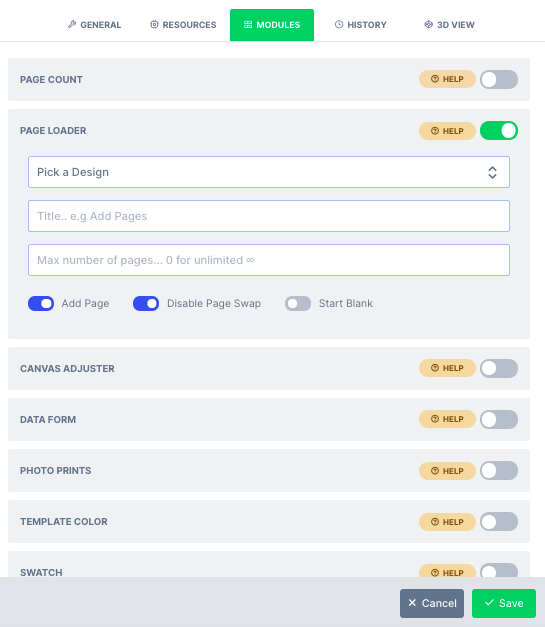 As shown above, a source design needs to be selected with multiple pages. Ensure the source design and the target design are of the same units. Other options are described as follows:
* **Add Page:** This option when enabled, allows users to add new page from the source design into the main design.
* **Swap Page:** This option allows the users to swap their existing page with a new one from the source design.
* **Delete Page:** This gives users ability to delete pages from the current design
* **Start Blank:** When enabled, this option deletes all the pages from the existing design so your users gets to start by adding pages afresh from the source design
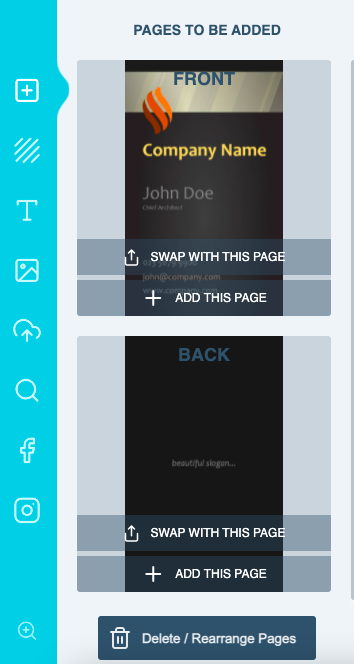
This is how the module appears in your designer with all the options enabled..
As shown above, a source design needs to be selected with multiple pages. Ensure the source design and the target design are of the same units. Other options are described as follows:
* **Add Page:** This option when enabled, allows users to add new page from the source design into the main design.
* **Swap Page:** This option allows the users to swap their existing page with a new one from the source design.
* **Delete Page:** This gives users ability to delete pages from the current design
* **Start Blank:** When enabled, this option deletes all the pages from the existing design so your users gets to start by adding pages afresh from the source design
This is how the module appears in your designer with all the options enabled..
 You can find a demo here: [Photo frames page loader demo](https://wp.demo.pitchprint.io/product/photo-frames-page-loader/)
This documentation is built and hosted on [Mintlify](https://mintlify.com), a developer documentation platform.
You can find a demo here: [Photo frames page loader demo](https://wp.demo.pitchprint.io/product/photo-frames-page-loader/)
This documentation is built and hosted on [Mintlify](https://mintlify.com), a developer documentation platform.