> ## Documentation Index
> Fetch the complete documentation index at: https://pitchprint.com/llms.txt
> Use this file to discover all available pages before exploring further.
# Grommets
> Add reinforced eyelet holes to banners and signage by entering a Grommet spacing tag in the page settings of a design.
Grommets are metal or plastic eyelets inserted into pre-punched holes in printed materials. They reinforce the hole to prevent abrasion and tearing, giving your products greater durability and ease of installation.
This feature is especially useful for products such as banners, signage, flags, posters, canvas prints, and other items where hanging or securing with cords is required.
Grommets can be added to the canvas by inserting a **tag directly into the page** that defines the horizontal and vertical spacing values.
Your tag should be written as follows:
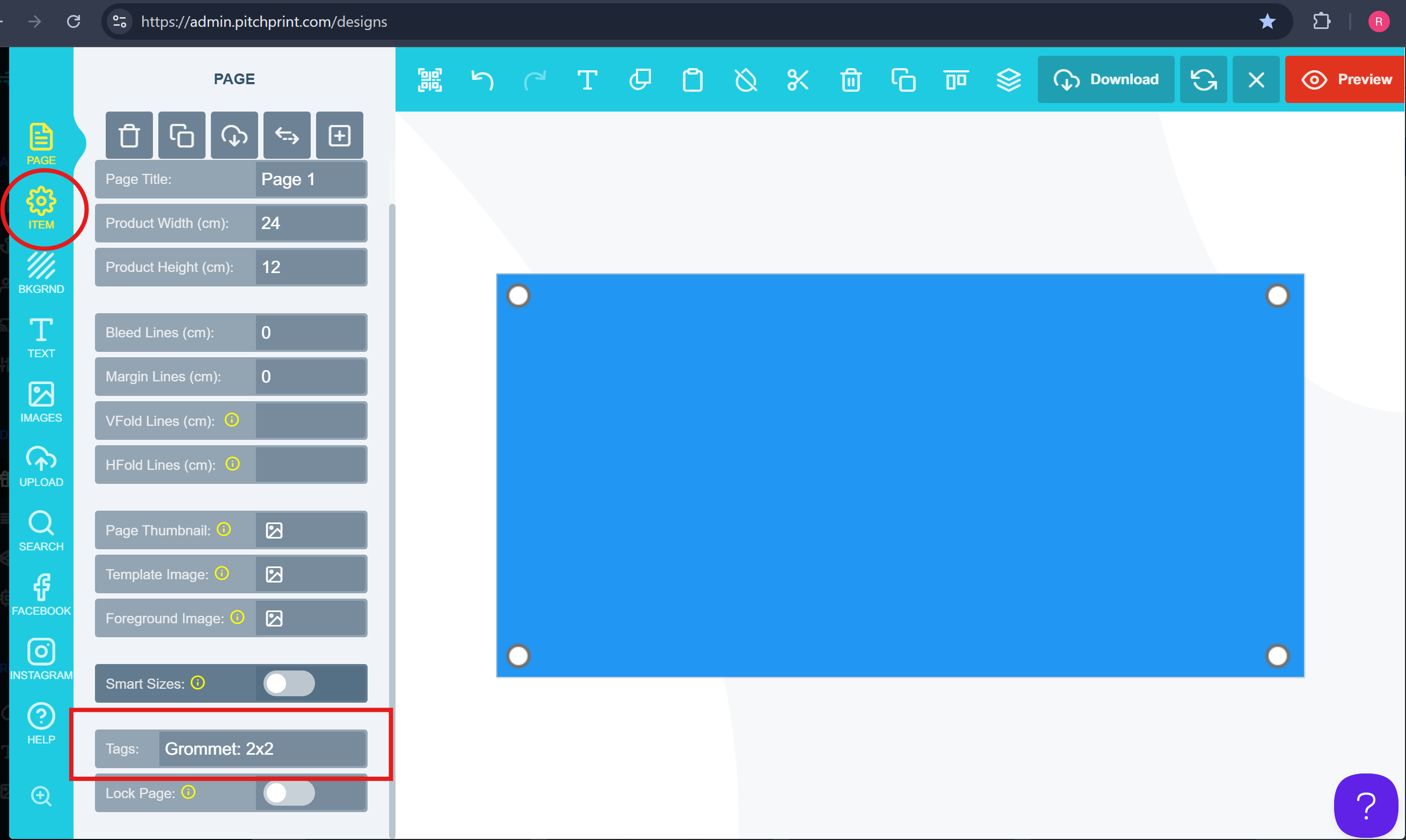
Grommet: 2 x 2
* The first value (**2**) represents the **Horizontal spacing**.
* The second value (**2**) represents the **Vertical spacing**.
These values correspond to the measurement units defined in your product setup (e.g., inches, centimeters, millimeters).
### To Enable Grommets
Follow the steps below:
Open your **Design** in PitchPrint.
Click on **Page Settings**.
Locate the **Tags** section.
Enter your grommet tag as shown below.
 **Note:**
* **Horizontal values:** Any value may be entered.
* **Vertical values:** Only the values **1** or **2** are permitted.
* **Synchronization:** Any changes made at the top of the page will automatically be applied to the bottom of the page as well.
Save your design, and you’re all set! If you encounter any issues, please contact us at **[support@pitchprint.com](mailto:support@pitchprint.com)**
## Related articles
Create guides for reinforcement holes that pass through the design.
This documentation is built and hosted on [Mintlify](https://mintlify.com), a developer documentation platform.
**Note:**
* **Horizontal values:** Any value may be entered.
* **Vertical values:** Only the values **1** or **2** are permitted.
* **Synchronization:** Any changes made at the top of the page will automatically be applied to the bottom of the page as well.
Save your design, and you’re all set! If you encounter any issues, please contact us at **[support@pitchprint.com](mailto:support@pitchprint.com)**
## Related articles
Create guides for reinforcement holes that pass through the design.
This documentation is built and hosted on [Mintlify](https://mintlify.com), a developer documentation platform.